
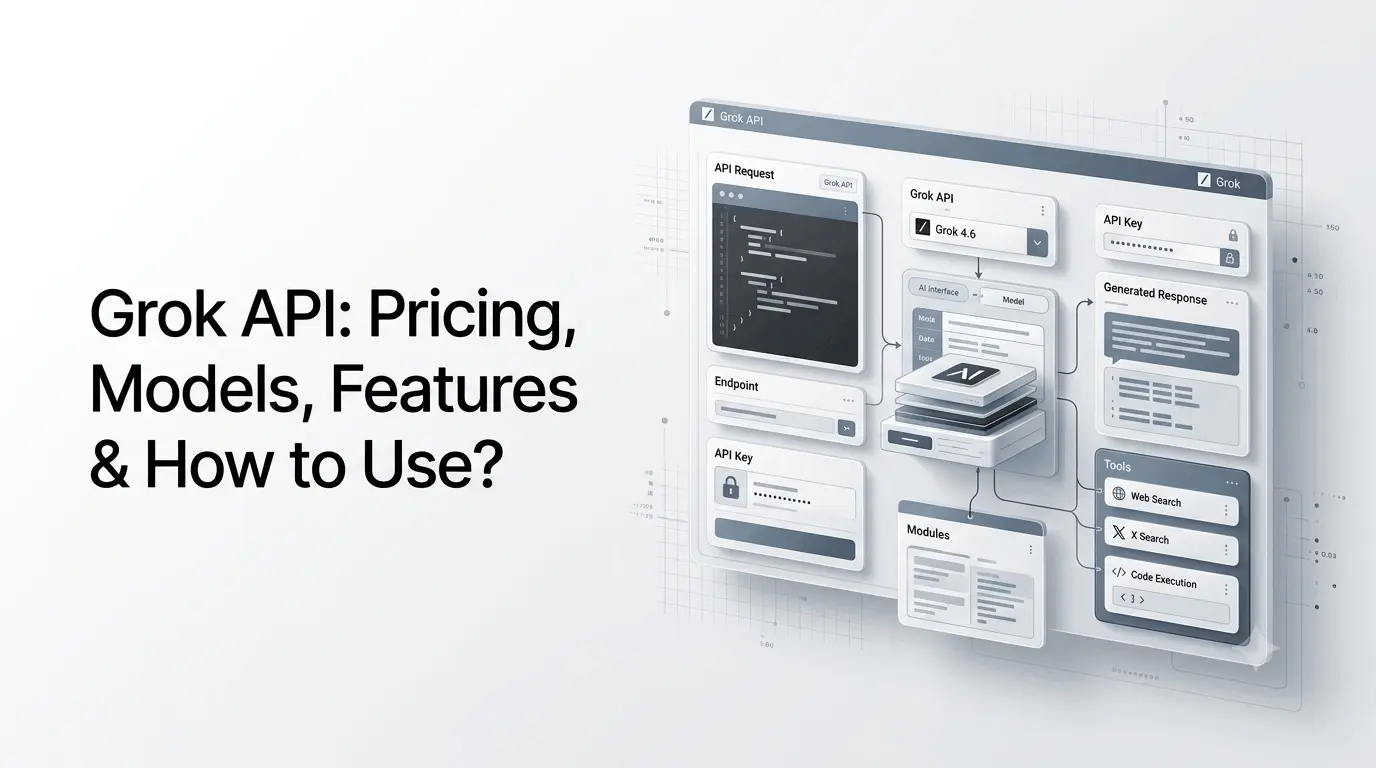
The Grok API is xAI’s developer platform for integrating Grok models and AI capabilities into applications, websites, agents, and business workflows. Developers can use it for text generation, reasoning, coding, image understanding, web search, X search, code execution, structured outputs, file-based retrieval, image and video generation, and voice applications.
Grok 4.6 is xAI’s flagship API model. It has a 500,000-token context window, supports text and image input, configurable reasoning, function calling, structured outputs, web search, X search, and code execution. Standard short-context pricing is $2 per million input tokens and $6 per million output tokens, with separate long-context pricing.
This makes the API useful for developers building everything from simple AI chat features to research assistants, coding tools, autonomous agents, content systems, and multimodal applications.
What is the Grok API?
Grok API is xAI’s programmatic interface for accessing Grok models and related AI services from software applications. Instead of interacting with Grok through the consumer website or X, developers send API requests from their own applications and receive model-generated responses.
The API can be used to build:
- AI chatbots
- Customer-support assistants
- Coding tools
- Research applications
- AI agents
- Content-generation systems
- Document analysis tools
- Search assistants
- X-powered research applications
- Image and video generation tools
- Voice applications
- Internal business assistants
The current xAI API provides REST and gRPC interfaces, with official SDK support and compatibility with common developer tooling. The REST API is also compatible with the OpenAI API format, which can simplify migration for applications already using OpenAI-compatible clients.
How Does the Grok API Work?
At a basic level, the process looks like this:
Your application → API key → Grok model → response → your application
A typical request contains:
- Your API authentication key
- A model name
- User or system instructions
- Optional tools or files
- Optional configuration such as reasoning effort
- The API response
For example, a developer could send a request to Grok 4.6 asking it to analyze a customer message and return a structured classification.
The API then processes the request and returns the model’s response to the application.
Responses API and Chat Completions
xAI currently supports both the Responses API and Chat Completions. The Responses API is designed for stateful interactions and tool-enabled workflows, while Chat Completions remains available for compatible applications.
For new agentic applications, the Responses API is particularly useful because it can work with server-side tools such as web search, X search, and code execution.
What Can You Build With the Grok API?
The API is broader than a conventional text-generation endpoint.
AI Chatbots
Developers can embed Grok-powered assistants into:
- Websites
- SaaS applications
- Mobile apps
- Internal tools
- Customer-support systems
The application controls the user interface while the Grok API provides the underlying model intelligence.
AI Research Assistants
With web search and X search tools, developers can build systems that gather current information rather than relying solely on the model’s training data.
For example:
User question → Web Search → X Search → Grok analysis → cited answer
xAI’s documentation specifically provides server-side web search and X search tools for these workflows.
Coding Applications
Grok 4.6 is positioned by xAI as a model for coding, agentic tasks, and knowledge work. Its API supports reasoning and code execution, making it suitable for developer assistants and coding workflows.
AI Agents
Function calling, tools, reasoning, and long context allow developers to build applications where the model can determine which action or external tool is needed.
For example:
User request → Grok reasons → calls tool → receives result → analyzes result → responds
This is substantially different from simply generating text.
Grok API Features
The current API includes a broad collection of capabilities.
1. Text Generation
Grok models can generate:
- Text
- Code
- Summaries
- Explanations
- Structured responses
- Business content
- Research reports
Grok 4.6 is currently the primary general-purpose model recommended by xAI for code and other text-based workloads.
2. Reasoning
Grok 4.6 supports configurable reasoning effort:
- Low
- Medium
- High
- Xhigh
The default is high on the current model documentation. Developers can therefore adjust reasoning based on the complexity and latency requirements of their application.
3. Large Context Window
Grok 4.6 has a 500,000-token context window.
This is useful for applications that need to process large amounts of information, such as:
- Long documents
- Codebases
- Research material
- Extended conversations
- Large business datasets
However, large context does not automatically mean that every application should send massive prompts. Longer requests can cost more, particularly when they cross xAI’s long-context pricing threshold.
4. Image Understanding
Grok 4.6 accepts image input alongside text.
Developers can therefore build applications that analyze visual information, such as screenshots, diagrams, documents, or other supported images.
The current documentation lists a maximum image size of 20 MiB and supports JPEG/JPG and PNG inputs.
5. Function Calling
Function calling allows Grok to connect with external software and systems.
For example, an application could expose functions such as:
- Search database
- Check order
- Create ticket
- Retrieve account information
- Book appointment
- Query inventory
Grok can determine when a function is appropriate and return the structured tool call to the application.
6. Structured Outputs
Structured outputs allow developers to request responses in a defined format instead of relying on free-form text.
This is useful when the output needs to feed directly into software.
For example:
{
  "category": "support",
  "priority": "high",
  "sentiment": "negative"
}
This makes Grok more practical for production applications where predictable output structures are important.
7. Web Search
The Grok API can use a server-side web search tool to retrieve current information.
This is particularly useful because the model’s built-in knowledge does not automatically provide real-time information.
xAI explicitly states that realtime data requires search tools such as Web Search or X Search.
8. X Search
X Search provides access to information from X.
The tool can perform:
- Keyword search
- Semantic search
- User search
- Thread fetching
This can be useful for social listening, trend analysis, brand monitoring, research, and applications that need current conversations from X.
9. Code Execution
Grok can use code execution for tasks requiring computation or programmatic analysis.
This can help with:
- Calculations
- Data analysis
- Transformations
- Testing logic
- Research workflows
xAI currently charges separately for server-side code-execution invocations in addition to normal model token usage.
10. File and Collection Search
Developers can build retrieval-augmented applications using uploaded files and collections.
The Collections Search capability allows Grok to retrieve relevant information from a developer’s document collection rather than relying exclusively on general model knowledge.
This can be useful for:
- Company knowledge bases
- Product documentation
- Internal policies
- Technical manuals
- Customer-support information
11. Image and Video Generation
The broader xAI API platform now includes the Imagine API for image and video generation and editing.
Current offerings include:
- Grok Imagine Image 2.0
- Grok Imagine Video 1.5
These are separate from the Grok 4.6 text model and are accessed through dedicated media APIs.
12. Voice APIs
xAI also provides voice capabilities, including:
- Speech-to-speech
- Speech-to-text
- Text-to-speech
This allows developers to build conversational voice applications using the broader xAI API ecosystem.
Grok API Models in 2026
The API model lineup changes frequently as xAI retires older models and introduces newer ones.
As of September 2026, the main text models listed in xAI’s pricing documentation include:
| Model | Context | Short-Context Input | Short-Context Output | Best For |
|---|---|---|---|---|
| Grok 4.6 | 500K | $2/M | $6/M | General AI, coding, reasoning, agents |
| Grok 4.5 | 500K | $2/M | $6/M | Coding, reasoning, knowledge work |
| Grok 4.3 | 1M | $1.25/M | $2.50/M | Lower-cost text workloads |
| Grok 4.20 Multi-Agent | 1M | $1.25/M | $2.50/M | Multi-agent workloads |
| Grok 4.20 Reasoning | 1M | $1.25/M | $2.50/M | Reasoning workloads |
These prices are for short-context requests. xAI applies higher rates when a request reaches the long-context threshold.
The model list can change, so developers should check the official model documentation before selecting a model for a production application.
What Happened to Older Grok Models?
xAI has been actively retiring older API models.
For example, several older models, including Grok 3, Grok 4, and earlier Grok 4 Fast variants—were retired from the API in May 2026. Requests to the retired slugs were redirected to Grok 4.3 under xAI’s migration system.
This illustrates an important consideration for developers: do not assume that an API model will remain available indefinitely.
Using stable aliases can simplify upgrades, while dated model identifiers can provide more predictable behavior when consistency is more important than automatically receiving the newest version. xAI recommends aliases for users who want automatic access to newer stable versions and dated identifiers for workflows requiring consistency.
Grok API Pricing
Grok API pricing is usage-based rather than a fixed monthly subscription. Developers pay according to tokens consumed and, when applicable, additional tool usage.
For Grok 4.6, the current standard short-context rates are:
- Input: $2 per 1 million tokens
- Cached input: $0.50 per 1 million tokens
- Output: $6 per 1 million tokens
For prompts reaching the long-context threshold of 200,000 tokens or more, Grok 4.6 is priced at:
- Input: $4 per 1 million tokens
- Cached input: $1 per 1 million tokens
- Output: $12 per 1 million tokens
Additional API Costs
Token costs are not the entire bill when using server-side tools.
Current listed tool prices include:
| Tool | Current Price |
|---|---|
| Web Search | $5 / 1,000 calls |
| X Search | $5 / 1,000 calls* |
| Code Execution | $5 / 1,000 calls |
| File Attachments | $10 / 1,000 calls |
| Collections Search | $2.50 / 1,000 calls |
- xAI has announced that from September 21, 2026, X Search pricing will change from $5 per 1,000 calls to $5 per 1,000 posts fetched and $10 per 1,000 user profiles fetched.
This matters for agentic applications because one user request can trigger multiple tool calls.
For example, a research assistant might generate costs from:
Model tokens + web searches + X searches + code execution
Developers should therefore measure complete workflow costs rather than looking only at the model’s token price.
Is the Grok API Free?
The Grok API itself is not a permanently free API service.
xAI uses usage-based billing for API requests. However, the API Console includes a Playground that lets developers test models, and developers can create an API account and key through the xAI Console.
This is different from consumer access to Grok through products such as Grok.com or X.
A Grok subscription and an API account should therefore be treated as separate developer and consumer access paths.
How to Get a Grok API Key?
Getting started is relatively straightforward.
Step 1: Create an xAI API account
Create an account through the xAI developer console.
Step 2: Open API Keys
Go to the API Keys section and create a new API key.
Step 3: Store the key securely
Do not put an API key directly into public JavaScript, a GitHub repository, or client-side application code.
For a web application, keep the key on your server and have your frontend communicate with your backend.
Step 4: Select a model
For general-purpose applications, Grok 4.6 is currently the flagship model.
Use the dedicated Imagine and Voice APIs when your application requires media or voice capabilities.
Step 5: Send your first request
The current documentation provides examples using the xAI SDK, JavaScript, OpenAI-compatible clients, and cURL.
A simple OpenAI-compatible request can look like:
from openai import OpenAI

client = OpenAI(
    api_key="YOUR_XAI_API_KEY",
    base_url="https://api.x.ai/v1"
)

response = client.responses.create(
    model="grok-4.6",
    input="Explain how an API works in simple terms."
)

print(response.output_text)
The important parts are the xAI API key, the https://api.x.ai/v1 base URL, and the selected Grok model. xAI documents this compatibility directly in its current Grok 4.6 API guide.
How to Use Grok API With Web Search?
One of the more useful features for research applications is server-side web search.
A developer can provide the web-search tool alongside the model request.
Conceptually:
User question
      ↓
Grok 4.6
      ↓
Web Search
      ↓
Retrieved sources
      ↓
Grok analysis
      ↓
Answer with sources
This can be used to build:
- News research assistants
- Market intelligence tools
- SEO research systems
- Competitive monitoring
- Real-time knowledge assistants
The Responses API supports tools including web_search, x_search, and code execution.
How to Use Grok API With X Search?
X Search is particularly relevant for applications that need information from social conversations.
A developer could build a tool that:
- Receives a topic.
- Searches relevant X posts.
- Retrieves conversations or threads.
- Groups recurring themes.
- Asks Grok to analyze the results.
- Produces a structured report.
This could be useful for social listening, brand research, market analysis, and trend monitoring.
However, developers should account for X Search’s separate usage costs and upcoming September 21, 2026 pricing change.
Grok API for AI Agents
The API is increasingly designed for agentic applications rather than simple question-and-answer systems.
Grok 4.6 supports:
- Reasoning
- Function calling
- Web search
- X search
- Code execution
- Structured outputs
- Long context
- External tool integration
This allows developers to construct workflows where the model can decide what information or tool it needs before producing a final result.
For example:
Goal → Research → Tool calls → Analysis → Action → Final result
A marketing research agent could search the web, analyze X conversations, run calculations, and return a structured report.
A customer-support agent could retrieve information from a company knowledge base, classify the customer’s issue, and call an internal function to create a support ticket.
Grok API vs Grok App
The consumer Grok experience and the API serve different purposes.
| Feature | Grok App | Grok API |
|---|---|---|
| Primary user | Consumers | Developers |
| Interface | Chat interface | Code/API |
| Build custom application | Limited | Yes |
| Programmatic access | No | Yes |
| Function calling | Product-dependent | Yes |
| Web/X tools | Available depending on product | Developer-controlled |
| Usage billing | Subscription/product limits | Usage-based |
| Custom workflows | Limited | Extensive |
| Integrate into SaaS | No | Yes |
| Build AI agents | Product features | Developer-controlled |
If you simply want to chat with Grok, the consumer product is more appropriate.
If you want to build something using Grok, the API is the relevant product.
Grok API vs OpenAI API
The two platforms are competing developer ecosystems, but they are not identical.
One practical difference is that xAI’s REST API is designed to be compatible with the OpenAI API format. This means developers already using OpenAI-compatible SDKs can often point the client toward xAI’s API endpoint and change the model configuration.
The choice between them should depend on:
- Model performance for the specific workload
- Pricing
- Context requirements
- Tool availability
- Search requirements
- Multimodal capabilities
- Reliability
- Geographic availability
- Existing infrastructure
- Vendor requirements
There is no universal “best API” for every application.
Important Grok API Limitations
Before deploying Grok in production, developers should understand several limitations.
a) API pricing can become complex
A simple text request may be inexpensive, but agentic applications can make multiple tool calls.
The total cost can therefore be substantially higher than the model’s base token price.
b) Real-time information requires tools
Grok’s model knowledge does not automatically provide live information.
xAI explicitly states that developers need to enable Web Search or X Search when they require real-time information.
c) Models change over time
xAI regularly introduces new models and retires older ones.
Production applications should therefore monitor model lifecycle announcements and migration documentation.
d) Large context is not free
Grok 4.6’s 500K context window is useful, but long-context requests use higher pricing once the threshold is reached.
e) Tool results require validation
Giving an AI access to tools does not make every tool result correct.
Applications should validate important outputs before taking consequential actions.
Who Should Use the Grok API?
The Grok API is best suited to developers and organizations that need to integrate AI into software.
It can be particularly useful for:
- SaaS developers
- AI startups
- Web developers
- Mobile developers
- Enterprise engineering teams
- AI-agent builders
- Research platforms
- Content platforms
- Social listening tools
- Customer-support applications
- Developer tools
It is less useful if your only requirement is occasional AI conversation. In that situation, using Grok directly is simpler than building an API integration.
Best Practices for Using the Grok API
For production applications, several practices are especially important.
1. Protect API keys
Never expose API credentials in client-side code or public repositories.
2. Track costs
Monitor token usage and tool calls, especially for autonomous agents.
xAI added per-request cost information to API responses in 2026, making cost tracking easier.
3. Use prompt caching when appropriate
Repeated prompts can benefit from caching, particularly when applications send the same instructions or context repeatedly.
4. Use streaming for agentic workflows
xAI recommends streaming for agentic tool calling because it provides visibility into tool calls and intermediate progress during longer requests.
5. Choose the smallest suitable model
Do not automatically use the most capable model for every request.
A simpler model may be sufficient for straightforward classification or transformation tasks, while more complex reasoning and agent workflows may justify a more capable model.
6. Keep humans involved in consequential actions
For applications that can send messages, make purchases, modify records, publish content, or perform other important actions, use explicit approval and validation mechanisms.
What Is New in the Grok API in 2026?
The API has expanded considerably during 2026.
Some notable developments include:
- Grok 4.6 added to the API in August 2026.
- 500K context and configurable reasoning with Grok 4.6.
- Grok 4.20 and Grok 4.20 Multi-Agent became available earlier in 2026.
- Context Compaction was introduced for long agent loops.
- WebSocket Responses API mode was added for tool-heavy workloads.
- Batch API expanded to image and video generation.
- Voice APIs expanded with speech-to-text, text-to-speech, and speech-to-speech capabilities.
- Imagine APIs expanded image and video generation.
- Grok Bot introduced durable AI teammates using persistent cloud computers.
The direction is clear: xAI is expanding the API from a text-generation service into a broader platform for multimodal and agentic applications.
Conclusion
The Grok API has developed into a broad platform for building AI-powered software rather than simply an endpoint for generating text.
With Grok 4.6, developers get a 500K-token context window, configurable reasoning, image input, function calling, structured outputs, and access to tools such as web search, X search, and code execution. The wider platform also includes dedicated APIs for images, video, files, and voice.
For developers building simple chat applications, the API can provide a straightforward way to add Grok intelligence to a product. For more advanced teams, its tool ecosystem and agent-oriented features make it suitable for research assistants, coding systems, enterprise workflows, and autonomous AI applications.
The main considerations are model selection, token usage, tool costs, API reliability, security, and model lifecycle changes. Developers should check xAI’s current documentation before deploying a production system because models, pricing, and capabilities continue to evolve.
Frequently Asked Questions (FAQs)
1. What is the Grok API?
The Grok API is xAI’s developer interface for integrating Grok models and AI capabilities into applications. It supports text, reasoning, coding, search, tool calling, image understanding, files, image generation, video, and voice capabilities.
2. How much does the Grok API cost?
Grok API pricing is usage-based. As of September 2026, Grok 4.6 costs $2 per million input tokens and $6 per million output tokens for short-context requests. Long-context requests use higher rates. Additional server-side tools can have separate charges.
3. Is the Grok API free?
No. API usage is billed based on usage. xAI provides a Playground through the API Console for testing, but production API calls are usage-based.
4. Which Grok model is best for API development?
For general-purpose development, Grok 4.6 is currently xAI’s flagship model for coding, reasoning, agentic tasks, and knowledge work. Specialized APIs are available for image, video, and voice workloads.
5. Can I use Grok API with OpenAI’s SDK?
Yes. xAI documents OpenAI-compatible API usage through the https://api.x.ai/v1 base URL. This can make migration or experimentation easier for applications already using OpenAI-compatible clients.
6. Does Grok API have web search?
Yes. The API provides a server-side Web Search tool. Developers can also use X Search for searching posts, profiles, and threads. These tools have separate usage charges.
Also Read –
Grok AI: What Is It? Features, Models, Use Cases & More