
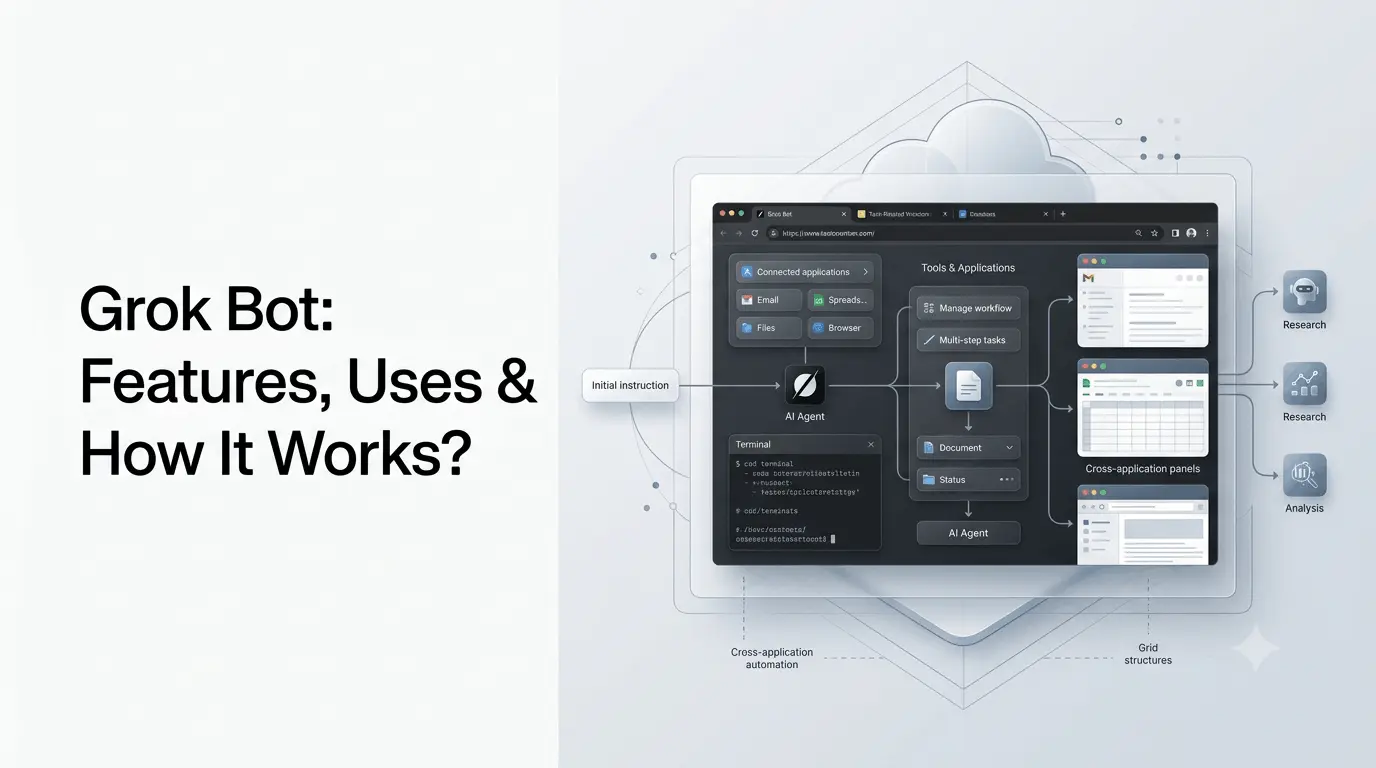
Grok Bot is an AI agent from xAI designed to do work on a user’s behalf rather than simply answer questions in a chat. It can operate a persistent cloud computer, interact with browsers and connected applications, work with files, follow routines, collaborate with other Bots, and return completed work for review.
xAI introduced Grok Bot in August 2026 as a system of “always-on” AI teammates. Unlike a conventional chatbot, a Bot can continue working after the user steps away and can interact with software through its own cloud computer.
This makes Grok Bot particularly relevant for research, sales prospecting, website building, inbox management, customer support, administration, and other repetitive or multi-step workflows.
Quick Summary –
- Grok Bot is xAI’s AI-agent system designed to perform tasks, not just answer questions.
- It can operate a cloud computer, browser, terminal, files, and connected applications.
- Users can delegate multi-step tasks such as research, sales prospecting, website building, inbox management, and customer support.
- Grok Bot supports multiple specialized Bots that can collaborate on larger workflows.
- Routines and automation allow recurring tasks to run with less manual involvement.
- Approval controls help keep sensitive actions such as sending, purchasing, deleting, or publishing under human supervision.
- Grok Bot is available with selected SuperGrok and Cursor plans, with enterprise access also expanding.
- Its biggest advantage is combining AI reasoning with real computer-based execution.
- Because agents can take actions, users should carefully manage permissions, verification, and monitoring.
What Is Grok Bot?
Grok Bot is an agentic AI system from xAI that is designed to complete tasks across applications and digital environments.
Instead of only producing text, a Grok Bot can:
- Work on a persistent cloud computer
- Use a browser and terminal
- Sign into approved applications
- Read and create files
- Work across connected apps and inboxes
- Perform multi-step tasks
- Run tasks in parallel with other Bots
- Follow recurring routines
- Ask for approval before consequential actions
- Return completed work and supporting files
xAI describes Grok Bot as a digital teammate rather than simply a chatbot. The system was introduced in beta on August 11, 2026, and access was expanded later that month to additional subscription plans.
The key difference is therefore execution.
A conventional AI assistant might tell you how to build a website. A Grok Bot can potentially work through the browser, configure the required tools, build the site, and return the result.
How Does Grok Bot Work?
Grok Bot combines an AI model with a computer environment, application connections, files, instructions, and approval controls.
A simplified workflow looks like this:
User gives a goal → Bot plans the work → Bot uses tools → Bot performs actions → Bot checks results → Bot asks for approval when required → Bot returns the completed work
1. You Give the Bot a Job
You communicate with a Bot through a text-thread interface.
Instead of creating a detailed sequence of individual instructions, you can describe the outcome you want.
For example:
“Research these 20 companies, organize the information in a spreadsheet, and highlight companies that match these criteria.”
The Bot can then determine the steps required to complete the assignment.
2. The Bot Uses Its Own Computer
One of Grok Bot’s most important features is its persistent cloud computer.
xAI says Bots have their own computer in the cloud, with browser and terminal access. This allows them to perform work inside actual software rather than merely generating instructions or drafts in a chat window.
That distinction matters.
A text-only AI might generate:
“Here is the code you can use.”
An agent with computer access can potentially open the development environment, work with the code, test it, and produce the resulting artifact.
3. The Bot Connects to Applications
Grok Bot can work with applications and services that it has been given access to.
This can include tools such as:
- Cloud storage
- Calendar
- Slack
- Business applications
- Websites
- Payment-related systems
- Other connected services
The exact connectors and permissions depend on the current Bot environment.
The important concept is that the Bot can operate inside the tools where the work actually happens rather than requiring the user to manually transfer every output between applications.
4. The Bot Can Continue Working
A major distinction between Grok Bot and a standard conversational assistant is persistence.
xAI says Bots can keep working when the user steps away. This allows a task to continue without requiring the user to monitor every individual action.
This is particularly useful for jobs involving:
- Large amounts of research
- Repetitive administrative work
- Monitoring
- Data collection
- Multi-step workflows
- Recurring tasks
However, unattended execution does not mean users should give an agent unlimited authority. xAI’s own documentation recommends keeping consequential actions behind approval controls.
What Are the Main Features of Grok Bot?
Persistent Cloud Computer
The cloud computer is the foundation of Grok Bot’s ability to perform real work.
It provides the Bot with an environment where it can use:
- Web browsers
- Terminal tools
- Files
- Applications
- Connected services
This makes the system closer to a remote digital worker than a conventional chatbot.
Browser and App Interaction
Grok Bot can interact with websites and software through its computer environment.
For example, an agent could potentially navigate a website, enter information, download a file, inspect a result, and continue to the next step.
This is particularly useful when an application does not have a dedicated AI API but can be operated through a browser.
Multiple Bots
Users can create multiple specialized Bots and run them together.
xAI says users can stand up Bots for different roles, such as a researcher, writer, or chief of staff, and put them in a group conversation so they can pass work between one another.
A practical workflow might look like:
Research Bot → Analyst Bot → Writer Bot → Reviewer Bot
Instead of one general-purpose agent doing everything, each Bot can have a narrower role.
Routines and Automation
Grok Bot supports routines that allow a successful workflow to be repeated.
A routine can be configured to run according to a schedule or trigger, depending on the available automation capabilities.
xAI’s documentation recommends testing routines, defining failure conditions, specifying where partial results should be reported, and requiring approval for consequential operations.
According to the current documentation, a Bot can own up to 50 routines, while the system retains the 20 most recent run records for each Bot.
Skills
A successful workflow can be turned into a reusable skill.
This allows a Bot to retain a structured process rather than requiring the user to explain the same procedure repeatedly.
A useful approach is:
- Give the Bot a task.
- Review its result.
- Correct mistakes.
- Refine the workflow.
- Save the successful process as a skill.
- Test it on another input.
- Automate it only after the process is reliable.
xAI specifically recommends this type of progression when turning examples into durable Bots.
Files and Results
Bots can create and work with files as part of their tasks.
The Grok Bot documentation describes workflows in which Bots save files to a shared /workspace, allowing other Bots to access those files for handoffs.
For important work, xAI recommends preserving evidence such as:
- Source links
- Screenshots
- Timestamps
- Input/output filenames
- Action logs
- Information the Bot could not verify
This is especially important for research and business workflows where results need to be independently reviewed.
Approval Controls
Autonomous AI becomes risky when it can perform irreversible actions without human oversight.
Grok Bot therefore supports approval-oriented workflows.
For example, a Bot could:
- Research a customer.
- Draft an email.
- Prepare the message.
- Stop before sending it.
- Ask the user for approval.
The same principle can apply to purchasing, deleting data, publishing content, changing production systems, or other consequential actions.
xAI’s documentation specifically recommends requiring approval for actions such as sending, purchasing, deleting, publishing, or changing production systems.
What Can Grok Bot Do?
Grok Bot is designed for jobs that require multiple steps rather than one-off answers.
Some practical examples include:
Research
A research Bot can gather information from approved sources, organize findings, and produce a source-linked report.
For example:
Task: "Research the latest developments from these 15 AI companies and create a weekly report with sources."
The Bot could collect the information, organize it, and return a structured result.
Sales Prospecting
xAI lists sales prospecting as one of its example workflows.
A Bot can research and enrich accounts, prepare personalized outreach, and leave sending actions for human approval.
A simplified workflow is:
Find prospects → Research company → Identify relevant information → Draft outreach → Request approval
This can reduce repetitive research while keeping the final communication under human control.
Website Building
Website development is another example highlighted by xAI.
A Grok Bot can work on website-building tasks, including browser-based configuration and deployment workflows. xAI describes an example in which a Bot builds a site, handles domain-related steps, configures plugins, and deploys the finished result.
This is especially interesting because the agent is not merely generating HTML or explaining how to build a site. It can potentially operate the tools required to complete the workflow.
Inbox Management
An inbox-management Bot can review email, identify messages that require attention, and organize or summarize information.
For example:
Read inbox → Categorize messages → Identify urgent items → Draft responses → Leave sensitive actions for approval
This can be useful for people dealing with large volumes of routine email.
Customer Support
Grok Bot can also be configured for support workflows.
xAI gives an example of a customer-support Bot that reads support email, connects with a payment provider, and handles routine refunds according to a company’s policy.
For production environments, businesses would need appropriate permissions, policies, auditing, and human escalation mechanisms.
Digital Administration
Bots can perform administrative workflows involving multiple systems.
Examples include:
- Managing work orders
- Organizing calendars
- Preparing reports
- Checking subscriptions
- Processing routine information
- Coordinating tasks across applications
The value is highest when the process is repetitive and has clearly defined rules.
Grok Bot vs Traditional Chatbots
The difference becomes clearer when comparing the two approaches.
| Capability | Traditional AI Chatbot | Grok Bot |
|---|---|---|
| Answer questions | Yes | Yes |
| Generate text | Yes | Yes |
| Explain concepts | Yes | Yes |
| Use a computer | Usually limited | Yes |
| Work inside applications | Limited | Designed for this |
| Multi-step execution | Limited | Core capability |
| Persistent work | Usually limited | Yes |
| Multiple agents | Usually limited | Yes |
| Recurring routines | Varies | Yes |
| Human approvals | Varies | Built into workflows |
| File-based work | Yes | Yes |
| Background execution | Limited | Core use case |
The most important difference is not simply intelligence. It is the ability to act.
A chatbot primarily produces information.
An agent is designed to use information and tools to accomplish a goal.
Grok Bot vs Grok
Grok and Grok Bot are related, but they serve different purposes.
Grok is xAI’s broader AI assistant and model ecosystem.
Grok Bot is an agentic layer designed to perform work using computers, applications, connectors, files, routines, and other tools.
A simple comparison:
| Feature | Grok | Grok Bot |
|---|---|---|
| Conversational AI | Yes | Yes |
| Question answering | Core use | Supported |
| Research | Yes | Yes |
| Coding | Yes | Yes |
| Computer interaction | More limited | Core capability |
| Persistent work | Limited by workflow | Core capability |
| Routines | Available in broader Grok ecosystem | Core feature |
| Multi-agent collaboration | Limited | Yes |
| Application execution | Varies | Core capability |
In practice, Grok remains useful for normal conversations and information tasks, while Grok Bot is aimed at delegating actual jobs.
Who Can Use Grok Bot?
Grok Bot is aimed at individuals, professionals, developers, and businesses that have repetitive or multi-step digital work.
Potential users include:
Marketers
Marketing professionals could use Bots for:
- Competitor research
- Lead research
- Content research
- Campaign preparation
- Reporting
- Inbox workflows
Developers
Developers can use agents for:
- Website development
- Debugging
- Testing
- Documentation
- Research
- Repetitive development tasks
Sales Teams
Sales teams can use Bots for:
- Prospect research
- Account enrichment
- Lead qualification
- Outreach preparation
- CRM-related workflows
Business Owners
Small businesses could use Bots for:
- Administrative work
- Customer support
- Scheduling
- Reporting
- Website management
- Email organization
Researchers
Researchers can use Bots to automate parts of:
- Information gathering
- Source collection
- Data organization
- Report preparation
- Monitoring workflows
Is Grok Bot Free?
Grok Bot’s availability is tied to specific plans rather than being universally available to every Grok user.
As of August 26, 2026, xAI said Grok Bot was included with:
- SuperGrok
- SuperGrok Plus
- SuperGrok Heavy
- Cursor Pro
- Cursor Pro+
- Cursor Ultra
- Cursor Teams Standard
- Cursor Teams Premium
xAI also stated that Grok Bot has separate usage from existing Grok and Cursor plans, meaning Bot activity does not simply consume the same usage pool as the underlying subscription.
Enterprise availability expanded shortly afterward. xAI announced on September 3, 2026 that Grok Bot was available for enterprises, with enterprise customers receiving initial free usage during the rollout period.
Because plan availability and pricing can change, users should check the current Grok or xAI subscription page before making a purchasing decision.
What Is Grok Bot for Enterprise?
Grok Bot has also moved beyond individual users into enterprise deployment.
xAI announced Grok Bot for Enterprise in September 2026. The enterprise rollout allows organizations to invite employees and use Bots across company workflows.
This is an important development because enterprise AI agents need more than raw model intelligence.
Organizations also need:
- Access controls
- Permissions
- Security policies
- Approval workflows
- Auditability
- Reliable integrations
- Data controls
- Monitoring
These requirements become increasingly important as an agent moves from answering questions to changing data or performing actions in business systems.
How to Create a Useful Grok Bot?
The quality of an agent depends heavily on how clearly its job is defined.
A practical structure is:
Step 1: Define the Job
Instead of:
“Help me with marketing.”
Use:
“Research five competitors every Monday and create a source-linked summary of new product announcements, pricing changes, and major content updates.”
Step 2: Define the Sources
Tell the Bot which websites, applications, folders, or accounts it is allowed to use.
Step 3: Define the Output
Specify whether you want:
- A report
- Spreadsheet
- Email draft
- Summary
- Task list
- Presentation
- File
Step 4: Define Boundaries
Explain what the Bot must not do.
For example:
“Do not send emails, delete files, purchase anything, or publish content without approval.”
Step 5: Test Before Automating
Run the Bot manually first.
Check:
- Accuracy
- Source quality
- Completeness
- Failure handling
- Unexpected actions
- Output formatting
Only then should you create a recurring routine.
What Are the Limitations of Grok Bot?
Agentic AI introduces limitations that are different from ordinary chatbot problems.
i) AI Can Still Make Mistakes
A Bot can misunderstand an instruction, use the wrong information, or make an incorrect decision.
The ability to take action makes mistakes potentially more consequential.
ii) Website Interfaces Can Change
Bots that operate websites can encounter:
- Changed layouts
- Broken buttons
- Login changes
- CAPTCHAs
- New permission requirements
- Unexpected pop-ups
A workflow that works today may need adjustment after a website changes.
iii) Permissions Matter
The Bot can only safely work with applications and data it has been authorized to access.
Giving an agent unnecessary access increases the potential impact of an error.
iv) Automation Requires Monitoring
A recurring workflow should not simply be created and forgotten.
xAI recommends inspecting success and failure history, testing routines, defining retry behavior, and keeping important actions behind approval.
v) Not Every Task Should Be Fully Autonomous
Tasks involving money, sensitive information, public communication, deletion, or production systems may require human review.
The best workflow is often semi-autonomous, where the Bot does the time-consuming preparation and a person approves consequential actions.
Is Grok Bot the Same as an AI Agent?
Grok Bot is an example of an AI agent system, but the terms are not identical.
An AI agent is a broader concept describing software that can pursue goals by reasoning, using tools, observing results, and taking actions.
Grok Bot packages those capabilities into xAI’s product.
Its distinguishing characteristics include:
- Persistent computer access
- Tool and app interaction
- Long-running work
- Routines
- Multiple Bots
- Human approvals
- File handoffs
This places Grok Bot closer to an AI digital-worker model than a conventional chatbot.
What Makes Grok Bot Different?
The most important distinction is the combination of AI reasoning and computer-based execution.
Many AI products can generate excellent text or code.
Grok Bot is designed to take that output into the environment where the work actually needs to happen.
For example:
Traditional workflow
Research → Copy information → Open spreadsheet → Enter data → Write summary → Send report
Agentic workflow
Give the Bot the objective → Bot researches → Bot updates the spreadsheet → Bot creates the report → Bot asks for approval if needed
That difference can save significant time for repetitive digital work.
Conclusion
Grok Bot is xAI’s move from conversational AI toward autonomous digital work.
Instead of stopping after generating an answer, a Bot can use a persistent cloud computer, interact with applications, work with files, perform multi-step tasks, collaborate with other Bots, and run recurring routines.
Its most interesting applications are therefore not simple question answering but research, sales prospecting, website building, customer support, inbox management, administration, and other repeatable digital workflows.
The product is still developing rapidly. xAI expanded Grok Bot from its August 2026 beta launch to additional consumer and developer plans later that month and enterprise availability in September.
The biggest opportunity is also the biggest challenge: giving AI the ability to act makes it substantially more useful, but it also makes permissions, verification, monitoring, and human approval much more important.
For users considering Grok Bot, the best starting point is not to automate an entire business process immediately. Choose one repetitive task, define clear boundaries, test the Bot’s results, and automate only after the workflow proves reliable.
Frequently Asked Questions (FAQs)
1. What is Grok Bot?
Grok Bot is xAI’s agentic AI system designed to perform tasks using a persistent cloud computer, browser, terminal, connected applications, files, routines, and approval workflows.
2. Is Grok Bot different from Grok?
Yes. Grok is the broader AI assistant and model ecosystem, while Grok Bot is specifically designed to act as an AI teammate that can perform multi-step tasks across applications and digital environments.
3. Can Grok Bot use my computer?
Grok Bot operates through its own cloud computer, rather than directly taking control of your physical computer. xAI says Bots have browser and terminal access and can work inside connected applications.
4. Can Grok Bot work in the background?
Yes. Background and persistent work are central to the product. xAI describes Bots as capable of continuing work when the user steps away, while routines can be configured for recurring tasks.
5. Is Grok Bot included with SuperGrok?
As of August 26, 2026, xAI said Grok Bot was included with SuperGrok, SuperGrok Plus, and SuperGrok Heavy, as well as several Cursor plans. Availability can change, so current plan documentation should be checked before subscribing.
6. Can multiple Grok Bots work together?
Yes. xAI says users can run multiple Bots and put them into a group conversation so they can pass work between one another. This makes it possible to create specialized roles such as researcher, writer, and chief of staff.
Also Read –
Grok Bot Guides: How xAI Is Building Persistent AI Agent Workflows?