

OpenAI is reportedly experimenting with a brand-new feature for ChatGPT that will allow users to search their memories directly in a chat. The initial reports mention Memory Search -an option that will enable you to request ChatGPT to find particular pieces of context it previously saved (for instance, the web pages that you have visited within Atlas Chat, chat history, or any other information that you have stored) and immediately use them during the current chat.
The feature, currently under test per industry monitors, will create a speedy, searchable interface to ChatGPT’s memory layer. It could transform the way that people manage continuity and context with huge models of language.
What’s currently being said (and what’s officially reported)?
TestingCatalog and other related sites recently revealed that OpenAI is testing a “Memory search” feature for ChatGPT, which essentially allows users to run natural-language queries over the contents ChatGPT has saved for each user. The report suggests that this UI (or mode) is accessible in certain places, with different names. For instance, Atlas (OpenAI’s browser with integrated ChatGPT) displays browser history, and the language and layout differ across web and app interfaces. TestingCatalog presents this as a test in the early stages that could be a precursor to bigger updates (some websites link the test to the wider GPT-5.2 reports). However, OpenAI hasn’t made a public announcement of a product release with the name “Memory Search.”
OpenAI’s Atlas help and documentation pages prove it is possible to have the browser memory -the Atlas feature that stores the user-approved information from browsing (page highlights, pages, and other contextual information), which ChatGPT can use later to respond to specific questions. The company describes browser memory as an optional feature that can be controlled via settings. Users can access, store, or erase the memories. This infrastructure could be the basis for the Memory Search interface in ChatGPT’s web and mobile apps.
What Memory Search would work (likely behaviour)?
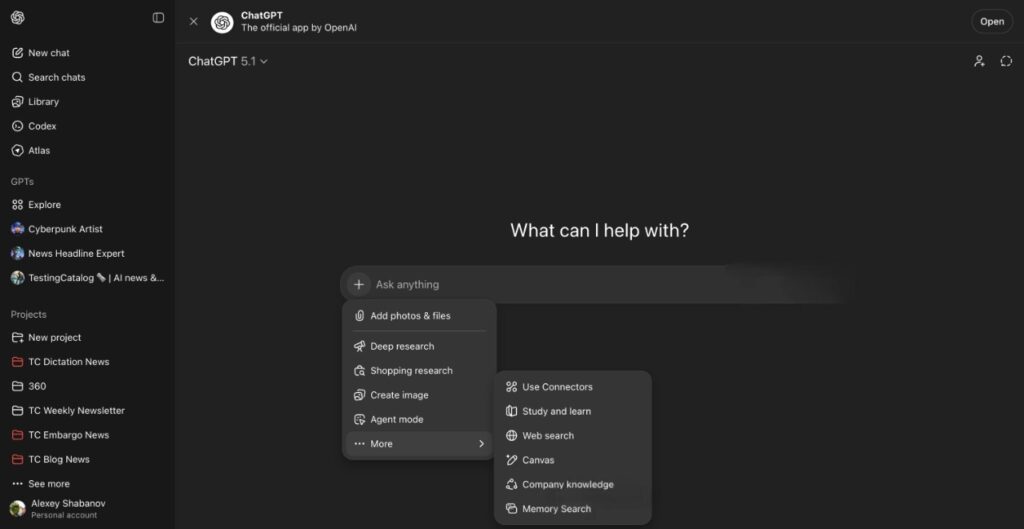
Based on the current Atlas behavior and test report, Memory Search — should it be rolled out is likely to exhibit these features:
- Natural Language Queries over the Saved Information: Instead of manually looking through settings or old chats, you can chat with ChatGPT and ask “Show me the job postings I looked at last month” or “Find the web pages where I saved recipes with chickpeas,” and the model would show you matching memories.
- Scored Search Mode: The feature may be displayed as a separate option and a UI toggle (e.g., “Memory search” instead of normal chat), making it obvious when ChatGPT is reading from memory rather than generating from the immediate context of a conversation. TestingCatalog refers explicitly to a labeled mode that appears in specific versions.
- Privacy and Control Options included in Settings: OpenAI’s existing memory controls allow users to review and erase saved memories. Memory Search would likely respect these controls and show only items the user has permitted to be saved. The documentation for OpenAI emphasizes users’ control over their browser’s memory, including the option to archive and delete.
Why it Matters to the User’s Benefit and Usage Instances?
Searchable layers of memory can help ChatGPT’s functionality in multi-step or longitudinal research workflows.
- A faster recall of past information: Users who rely on ChatGPT for ongoing projects can quickly access relevant historical facts, hyperlinks, or notes without having to repeat details.
- Improved continuity between conversations: Memory Search removes the difficulty of introducing context when conversations run long and can be used for private assistants, research, or content production.
- Context-aware, personalized answers: With explicit memory access, ChatGPT can deliver answers that refer to previous choices, pages saved, or documents. This is useful for planning travel and a job search, as well as for long-term learning.
OpenAI Tests Memory Search for ChatGPT: Security, Privacy, and Control- the Essential Cautions
Memory-related features that make them easier to access raise reasonable privacy issues. OpenAI’s Atlas and memory help pages emphasize user control: browser memories are optional, tied to browsing history, and can be managed (viewed/archived/deleted). All Memory Search rollouts should most likely follow the same controls and be clear about the content being searched. Users should be prepared to choose whether to participate in the rollout, read the content, and delete items they do not wish to be stored.
Security and moderation are the other aspects to be considered: searchable memories may expose sensitive personal data when not properly filtered or protected with sandboxing. Teams from the product development team typically design safeguards (redaction logs, access controls, or rate limits) to allow access to user data and expect similar protections once Memory Search becomes broadly available. At the moment, public reports indicate testing, not a full release, so security information is not available.
What could this be for the OpenAI plan of action?
Specific coverage links the Memory Search test to broader updates to the product and model, particularly speculation about a GPT-5.2 release or other significant enhancements. Industry analysts often interpret small UI experiments as indicators of larger platform shifts that teach models to view memory as a first-class, searchable datastore, a natural step towards more agentic assistants and more personalized ones. However, this rumor must be taken with caution; OpenAI has not confirmed the existence of a Memory Search product or tied it to any specific model or release.
What can you do to test it? Look out for a release.
- If you’re using Atlas, you should check your browser and memory control settings (OpenAI’s Atlas pages document browser memory and how best to handle it). New modes are usually first seen in beta builds, or in the web or desktop versions.
- Be sure to follow beta and testing channels: channels that release teardowns of products and beta results (like TestingCatalog) are often the first to announce UI labels and hidden flags.
Final Thoughts
The Memory Search mode would be a logical and practical extension of ChatGPT’s memory capabilities, making previous information more easily accessible while also improving continuity and speeding up workflows, provided that OpenAI integrates it with precise privacy controls and security measures. At present, the feature is in testing across a couple of builds and on surfaces. Users are advised to monitor the official OpenAI Channels and Beta Reports for official announcements.
FAQs
1. Is Memory Search already available to users?
It’s not widely available. TestingCatalog and other trackers indicate that OpenAI is currently testing the Memory Search feature; aspects of memory retrieval are available in Atlas as browser memories, but an integrated, labeled Memory Search mode for the ChatGPT main application has been mentioned only in tests so far.
2. What is the difference between Atlas’s “Browser memories” and Memory Search?
Browser memory is an Atlas feature that stores and reuses browsing contexts you allow. Memory Search appears to be a UI (or mode) that lets you search the saved memory directly in natural language, finding matches rapidly, rather than using the model to remember them.
3. Will my private data be exposed if Memory Search rolls out?
The documentation of OpenAI’s Atlas stresses the importance of user control over memory in browsers, which is optional and can be viewed, archived, or erased. The official version of Memory Search should respect these restrictions; however, users must always check the privacy settings for any application that stores or retrieves personal data.
4. Do I need GPT-5.2 to use Memory Search?
There’s no public confirmation tying Memory Search to GPT-5.2. Some reports link the test to chatter about new releases in models; however, Memory UI itself is a software-layer feature supported by a variety of models. Consider model rumors in isolation, separate from feature rollouts.
5. How do I opt out if I don’t want ChatGPT to store memories?
The OpenAI Atlas, as well as ChatGPT, has memory settings that allow users to deactivate or erase browser memory. Similar switches are also available in ChatGPT’s Personal Memory features. If you do not want any memory saved, make sure you check your settings and the application’s privacy settings.

