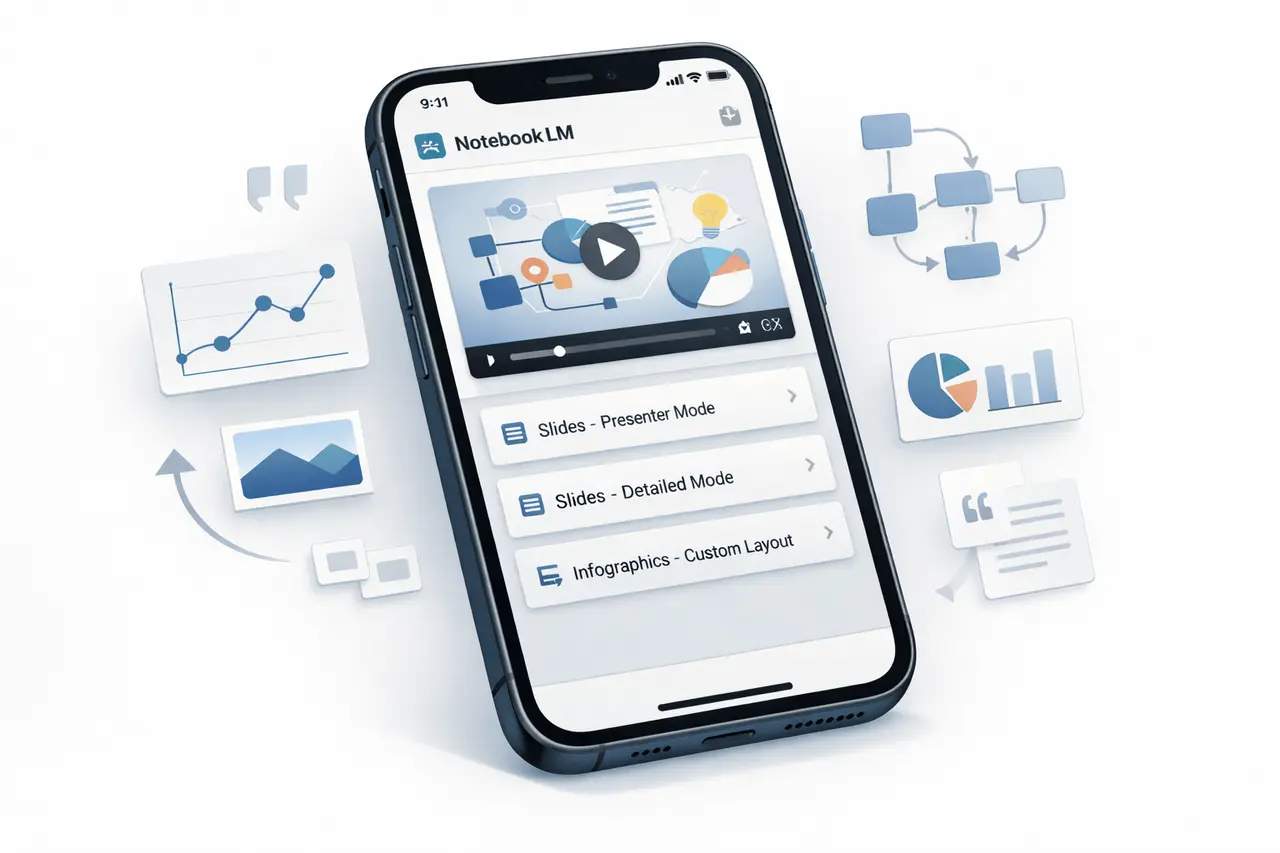
The NotebookLM iOS app has expanded its capabilities for visual creation, including video Overview generation and advanced options for customizing Slides or Infographics. The new features make the app an enhanced knowledge-to-visual workflow that helps users convert complicated source materials into clear, organized, and present-ready outputs.
Created and developed by Google, NotebookLM is designed to help users comprehend how to summarize, understand, and work on their own files. With the new iOS tools, NotebookLM moves beyond text-first assistance to visual explanation and communications, right using iOS devices.
What is NotebookLM on iOS?
NotebookLM is an AI-powered learning and research aid that operates on the user’s own sources, such as notes, documents, and reference materials. Instead of producing generic responses, the program generates outputs based on the uploaded content.
On iOS, the app focuses on mobile-friendliness, fast, quick understanding, making it easy to review and communicate information.
Why These New Visual Features Matter?
Modern communication and learning increasingly rely on images rather than long-form text alone. Slides, video explanations and infographics aid users:
- Grasp complex ideas more quickly
- Transmit your thoughts clearly to other people
- Convert raw information into assets that can be shared
By incorporating visual generation directly into NotebookLM’s iOS application, NotebookLM reduces the gap between presentation and research.
Video Overview Generation in NotebookLM iOS
One-Tap Visual Explanations
The brand-new Video Overview feature lets users create a visual aid with a single touch. The system will automatically draw information from the user’s sources to build a comprehensive explanation.
Video overviews can include:
- Images and diagrams derived from the source material
- Keywords and quotes to provide context
- Data points and numbers to help explain the concept
This technique ensures the video is rooted in the actual content, rather than an abstract summary.
Ideal Use Cases for Video Overviews
Overviews of videos are handy for:
- Decoding complex concepts or abstract ones
- Demonstrating step-by-step processes
- Making dense data more understandable
They can be instrumental in academic, analytical, and professional situations where clarity is crucial.
Infographic Customization Options
NotebookLM iOS additionally introduces enhanced control over infographic output. This allows users to customize visuals to suit their specifications.
Orientation and Layout Control
Users can select the format of the infographic which best fits their usage scenario:
- Landscape
- Portrait
- Square
This flexibility allows infographics to be used in presentations and documents, as well as for social sharing.
Language and Style Customization
Infographics can be created in a variety of output languages, making them ideal for multilingual teams and global viewers.
Users are also able to add a customized message for assistance:
- Visual style
- Themes of colour
- Content emphasis
For instance, users can instruct the system to utilize a blue colour palette or highlight a particular number of vital stats.
Slide Creation and Customization
Slides are the primary output format used by professionals and educators. NotebookLM iOS offers clear options for adapting to different presentation styles.
Two Distinct Slide Formats
Users can select between:
- Detailed Slides
- Complete information about each slide
- It is designed to be read on its own
- Presenter Slides
- Clean layout with essential talking points
- is intended to support live-streaming
This lets users customize slides for self-guided review or live presentation.
Language Control for Slides
Similar to infographics, slides can be produced in various output languages, enabling international collaboration and meeting localization requirements.
Feature Overview Comparison
| Feature Area | Key Capabilities | Primary Benefit |
|---|---|---|
| Video Overviews | Images, diagrams, quotes, numbers | Faster understanding of complex topics |
| Infographics | Orientation, language, style prompts | Clear, customizable visual summaries |
| Slides | Detailed vs Presenter formats, language | Better alignment with presentation goals |
Practical Applications Across Use Cases
Education and Learning
- Visual explanations of complex concepts
- Self-contained slides to be used for revision
- Infographics for quick information on checks
Business and Professional Work
- Presenting research findings
- Explaining workflows or processes
- Sharing information with the stakeholders
Research and Analysis
- Transforming source-heavy notes into visuals
- Highlighting key data points
- Reports that support visually structured reports
Benefits and Considerations
Key Benefits
- Visual outputs remain rooted in the user-provided source
- Flexible customization, without design experience
- Mobile-first design using iOS devices
Practical Considerations
- The best results are contingent on the structure and quality of the original content
- The visual formats have been optimized to explain, not for advanced animation
- Users must select formats based on the audience and the context
How This Fits Into the Broader AI Tool Landscape?
NotebookLM’s iOS updates align with an overall trend towards AI-aided visual communication. As opposed to text-only assistants or standalone design tools, NotebookLM is focused on:
- Based on the source, accuracy
- Explanation over decoration
- Integration of workflows for learning and presentation
It allows it to serve as a supplement to related AI models and other similar techniques used in research, summarization, and knowledge management.
My Final Thoughts
The NotebookLM iOS application’s inclusion of video-based overviews, custom infographics, and flexible slide formats is a significant step towards a visual-first approach to knowledge work. By using source-based AI with a practical approach to customization, these tools can help users understand and clearly communicate information.
Since visual explanations are increasingly important in education and workplace communication, NotebookLM’s iOS enhancements strengthen its position as a cutting-edge tool for making complex information easy to access, organize, and share.
Frequently Asked Questions
1. What is the primary purpose of Video Overviews in NotebookLM iOS?
Overview videos are created to help illustrate complex concepts using images, diagrams, quotations, and information sourced directly from users.
2. Do I have control over the appearance of infographics I create in NotebookLM?
Yes. Users can choose their orientation, output language, and even add custom prompts to guide them on style, colour, and focus.
3. How can you tell the differences between a Detailed and a Presenter slide?
The slides are detailed and include everything you need to read on your own, whereas Presenter slides show only the most essential speaking points for Live presentations.
4. Are these features accessible directly on the iPhone?
Yes. The updates were explicitly designed for NotebookLM. The NotebookLM iOS application is optimized for mobile devices.
5. Are there visuals that I can create in other languages besides English?
Yes. Slides and infographics can be used to change the language of the output.
Also Read –
Google NotebookLM Audio Lectures: 30-Minute Lecture Mode Tested