
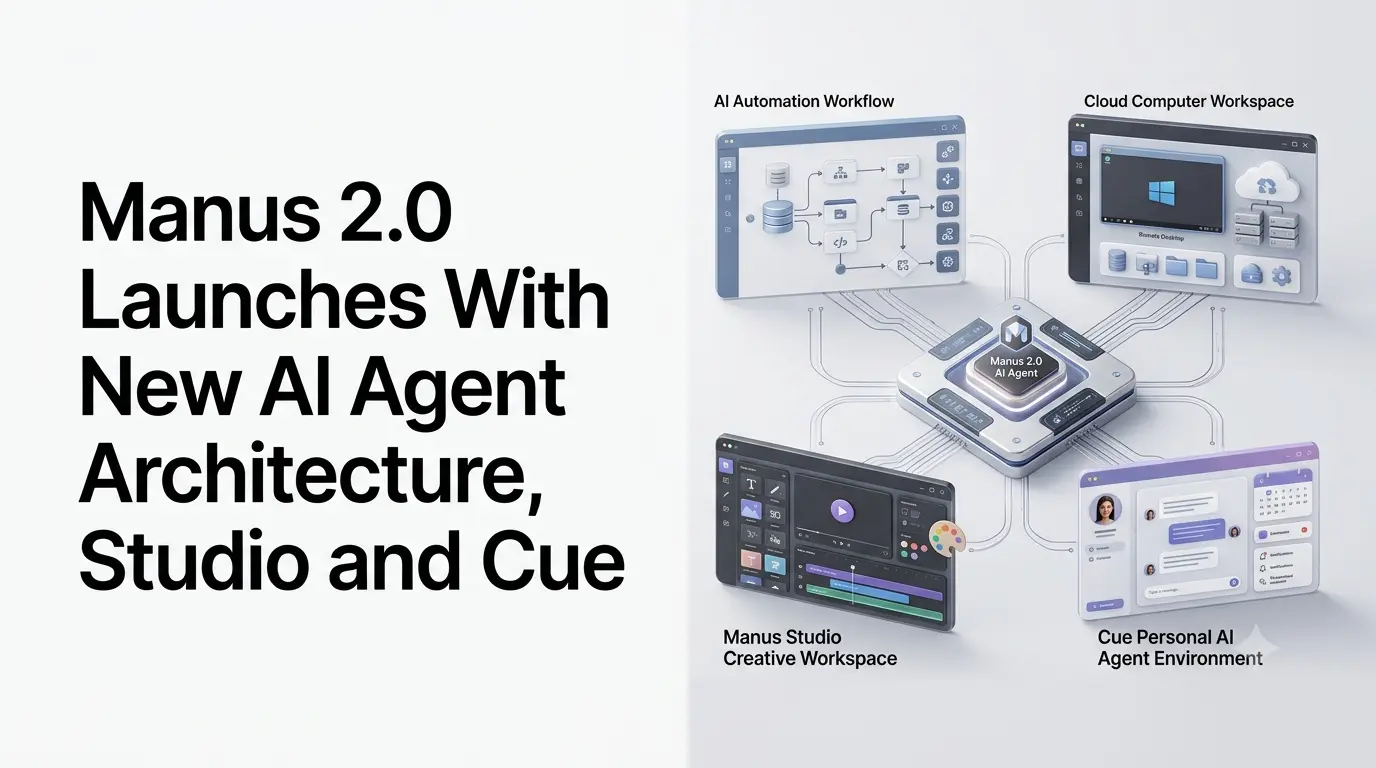
Manus has launched Manus 2.0, a major update to its AI agent platform that introduces a new agent architecture alongside Cloud Computer, event-driven Automations, a redesigned Manus Studio workspace, and a new personal-agent app called Cue. The company announced the release on September 28, 2026, with Manus 2.0 now available across its web, desktop, and mobile applications.
Rather than positioning the release as a conventional model or feature update, Manus describes Manus 2.0 as a new architecture and product direction built around a broader agent system. The update expands Manus from task-oriented AI assistance toward persistent workflows, professional content creation, computer control, and personal AI agents.
Quick Summary
- Manus has launched Manus 2.0, a major update to its AI agent platform.
- The release introduces a new agent architecture called Cascade.
- Cloud Computer allows certain projects and workloads to continue running remotely.
- Manus Automations can trigger workflows based on events from connected services.
- Manus Studio brings documents, code, websites, video and game development into one workspace.
- The update adds professional-oriented Video Editor and Game Dev environments.
- Manus has also introduced Cue, a personal AI-agent application built on Manus infrastructure.
- Manus 2.0 is available across the company’s web, desktop and mobile applications.
What Is New in Manus 2.0?
One of the central changes is Cascade, the latest version of Manus’ in-house agent harness. The system is designed to bring specialized capabilities into a project only when they are needed, while keeping different parts of a task connected.
According to Manus, one tested configuration using Cascade used 23.2% fewer tokens, completed tasks 28.2% faster, and cost 32% less to run than its previous system. These figures are company-reported results from a tested configuration rather than independent benchmark measurements.
The new architecture is intended to allow a single project to incorporate different types of work, including documents, websites, videos and automations, without treating each task as an isolated workflow.
Cloud Computer
Manus 2.0 also introduces Cloud Computer, a dedicated computing environment that users can purchase for projects requiring persistent execution.
The company gives examples such as multiplayer games that need an always-on server and automations that need to continue running when the user’s computer is offline. This extends Manus beyond temporary task execution by providing infrastructure where certain projects can remain active.
Manus Automations Add Event-Triggered Workflows
Another major part of Manus 2.0 is Automations, which expands the platform’s earlier scheduled-task functionality.
Previously, scheduled tasks could start work at a specified time. With Automations, Manus says workflows can also begin when an event occurs in a connected service.
Examples listed by the company include:
- A new email arriving
- A change in advertising performance
- A calendar event
- A Slack message
- An update in Notion
Users can describe what they want Manus to monitor and what should happen afterward, with the system setting up and running the workflow.
This makes Automations an important part of the Manus 2.0 architecture because the agent can respond to external events instead of requiring every task to be manually initiated.
Manus Studio Expands AI-Powered Creation
The desktop version of Manus has also been upgraded into Manus Studio, a workspace designed to combine people and AI during the creation process.
Studio supports documents, spreadsheets, PDFs, presentations, websites, code, games and video. Manus says it brings specialized capabilities into projects as required instead of keeping every capability active for every task.
Two new professional environments are particularly notable: Video Editor and Game Dev.
1. Video Editor
The new Video Editor is designed around editable timelines rather than requiring users to regenerate an entire video whenever they want to make a change.
Manus says generated clips, images, text, motion graphics and audio are available as separate components. Users can replace footage, change music, move animations and make other adjustments before exporting the final video. They can also ask Manus to make another pass based on their edits.
The company positions the tool for short product advertisements, AI-generated user content, tutorials, vlogs and motion-graphics videos.
Manus is also introducing Alchemy mode, which combines video and code generation to handle creative direction and production from an initial idea.
2. Game Dev
The Game Dev environment combines coding, image and video capabilities to help users build playable games.
Users can modify assets and code manually inside the editing environment while watching the game run. Manus also supports publishing games as websites and provides Cloud Computer infrastructure for multiplayer projects that require an always-on server.
This is a broader use of AI agents than simple code generation because Manus is combining development, asset creation, testing and hosting-related infrastructure within the same workflow.
Manus Adds Remote Computer Control
Manus 2.0 also expands its Computer Use capabilities through remote control.
The company says users can access and control their computer through Manus from a phone. In an example provided by Manus, a user can ask the agent to locate the latest presentation on a computer and send it to them while watching the desktop session remotely.
In an authorized session, Manus operates within its own visible workspace and can interact with approved files, browsers and applications. This allows the agent to continue working while the user is away from the computer.
The feature is particularly relevant to the broader shift toward AI agents that can take actions inside software environments rather than simply generate text in a chat interface.
Cue Introduces Personal AI Agents
Alongside Manus 2.0, the company has introduced Cue, a separate application for personal AI agents.
Cue is built on the same infrastructure as Manus and is available across web and desktop, with mobile access also provided. Manus says iOS availability is expected after App Store review.
One of Cue’s more ambitious features is giving each agent its own identity and resources. According to Manus, an agent can have its own email address, phone number, wallet and computer, allowing it to send messages, make payments within a user-defined budget and perform tasks on its own machine. Agents can also handle calls and provide summaries.
Cue also supports groups of agents working toward a shared objective. For example, different agents could research locations, create a shortlist and prepare presentation material as parts of the same project.
The company describes Cue as an early-access product. It is currently free with an invite code, with the code MEETCUE available to a limited number of early users on a first-come, first-served basis.
Manus 2.0 Availability
Manus 2.0 is available now through the company’s web, desktop and mobile applications. The desktop release is branded as Manus Studio, with downloads available for macOS and Windows.
Cue is available through the web and desktop, with mobile availability also listed by Manus. The company says the iOS version is still subject to App Store review.
The release therefore represents a broad expansion of the Manus platform rather than the introduction of a single new AI model. Its main changes span the underlying agent architecture, persistent computing, automated workflows, creative software, computer control and personal agents.
For users following the development of Manus 2.0, the most significant change is the move toward a more persistent agent ecosystem: Manus can now combine task execution with event-triggered workflows, dedicated computing environments and interactive creation tools, while Cue extends the same infrastructure into personal AI agents.
Also Read –
Manus Agents on Telegram: Features and Use Cases
Manus AI Always-On Agent: Features, Architecture and Use Cases
Manus Agent Selection for Scheduled Tasks Explained