
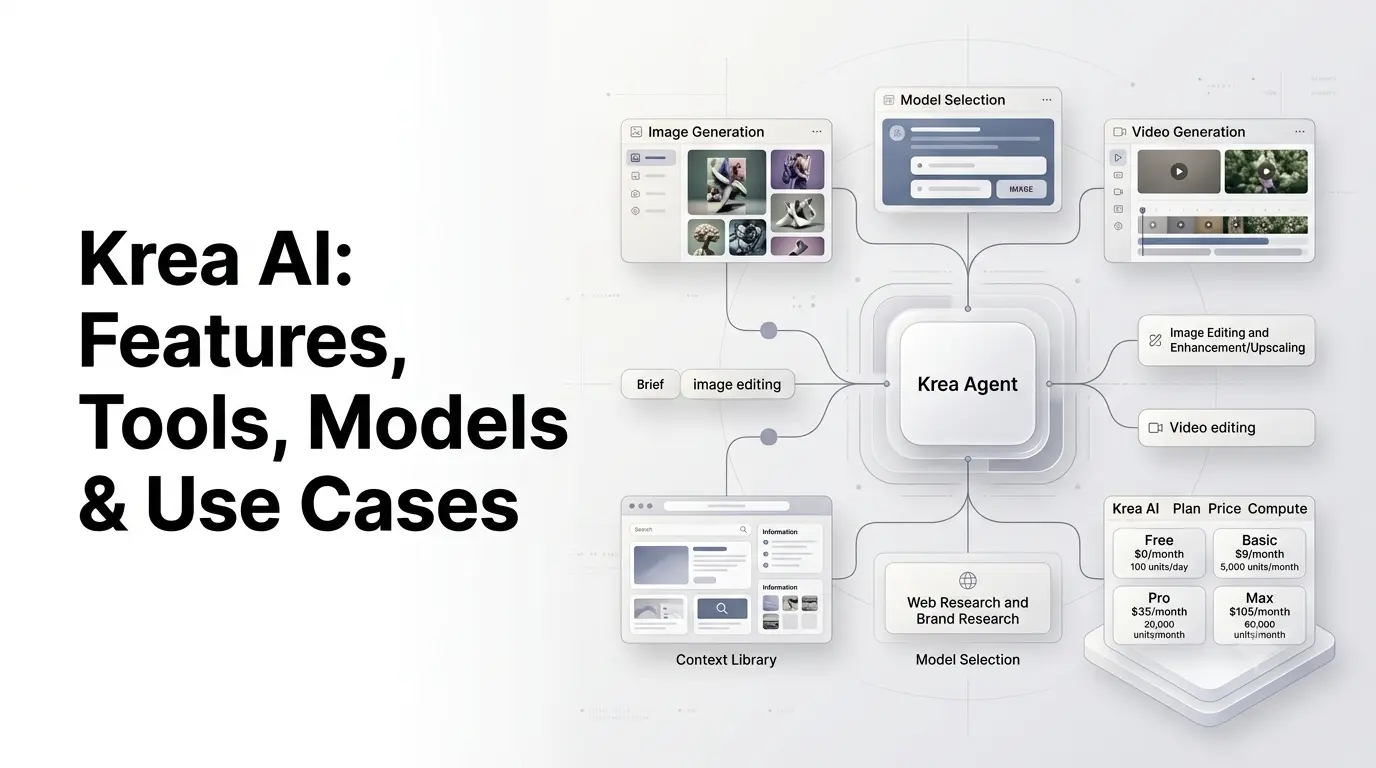
Krea AI is a creative AI platform that brings image generation, video generation, AI editing, real-time creation, upscaling, 3D, LoRA training, and workflow automation into one workspace. Instead of relying on a single AI model, Krea lets users work with multiple image and video models and move between generation, editing and enhancement tools without leaving the platform.
The platform has also expanded beyond standalone generation. Krea now includes its own Krea 2 foundation image model, Krea Agent, Node Agent, API and integrations with other AI models, making it useful for creators, marketers, designers, agencies and developers.
This guide explains what Krea AI is, how it works, its main tools, current models, pricing, use cases, limitations and how it differs from a single-model AI image generator.
Quick Summary
- Krea AI is an all-in-one creative AI platform for generating and editing images, videos, and other visual content.
- Krea 2 is Krea’s own image model, focused on creative control, style, and visual quality.
- It provides access to multiple AI image and video models from Krea and other providers.
- Key tools include Krea Edit, Realtime, AI Enhancer, LoRA training, moodboards, and 3D features.
- Krea Agent and Node Agent enable AI-powered creative workflows and automation.
- Krea also offers an API for developers to integrate image, video, enhancement, and other AI capabilities.
- Plans range from a free tier to paid compute-based plans, with features varying by subscription.
- Krea AI is useful for creators, designers, marketers, agencies, and businesses creating visual content at scale.
What Is Krea AI?
Krea AI is an AI-powered creative suite for generating, editing, enhancing and transforming visual content. It provides access to multiple AI models and combines them with tools for image generation, video, editing, real-time creation, upscaling, 3D, LoRA training and workflow automation.
The key difference between Krea and a single-purpose AI image generator is its multi-model workspace.
Instead of building a workflow around one model, users can compare different models, use reference images, edit generated results, upscale them and convert still images into videos within the same ecosystem.
For example, a creator could:
- Generate an initial concept with Krea 2.
- Try the same idea with another image model.
- Edit a selected result with Krea Edit.
- Upscale it with Krea Enhancer.
- Turn the image into a video.
- Continue editing or organize the resulting assets.
Krea describes this approach as giving users access to a broad collection of creative models and tools in one workspace.
What Can You Do With Krea AI?
Krea AI covers a broad range of creative workflows.
Its current ecosystem includes:
- AI image generation
- AI video generation
- Image editing
- Real-time AI generation and editing
- Image enhancement and upscaling
- 3D generation
- Video restyling
- Motion transfer
- Lip-sync
- LoRA training
- Moodboards
- AI agents
- Node-based workflows
- API access
- Asset and workspace management
The exact models available can change as Krea adds new releases. Its current model library includes dozens of image and video options from Krea and other AI companies.
Krea AI Features
1. AI Image Generation
Krea’s image generator supports both text-to-image and reference-image workflows.
Users can describe an image with a prompt, upload an existing image, or combine references with text instructions. Krea then lets users generate variations and compare different models.
This is useful for:
- Product photography
- Social media graphics
- Concept art
- Advertising
- Architecture
- Fashion
- Illustrations
- Website graphics
- Editorial imagery
Krea also supports different aspect ratios, allowing creators to produce formats for social posts, banners, websites and other channels without relying entirely on manual cropping.
2. Krea 2
Krea 2 is Krea’s own foundation image model, developed from scratch.
Krea says the model focuses particularly on aesthetic diversity, style control and creative direction, rather than simply producing conventional polished AI images. The model supports style references and moodboards, and Krea has also introduced LoRA-related workflows around it.
Krea 2 is available in different variants, including Krea 2 Large and Krea 2 Turbo.
Krea describes Krea 2 Large as its flagship image model for expressive visual generation across areas such as photography, architecture, illustration, 3D and product design. Krea 2 Turbo is positioned around faster generation and iteration.
3. AI Image Editing
Krea’s image editor allows users to modify an existing image using natural-language instructions and visual selections.
Depending on the workflow, users can:
- Remove unwanted objects
- Change backgrounds
- Replace individual objects
- Expand an image
- Combine references
- Apply styles
- Adjust details
- Relight scenes
- Colorize images
Krea Edit uses region-based editing, allowing users to select a specific part of an image and describe what should change while preserving the rest of the composition.
This makes Krea useful when the goal is not to generate an entirely new image, but to change one part of an existing visual.
4. Krea Realtime
Krea Realtime is designed around immediate visual feedback.
Rather than waiting for a conventional generation cycle, users can interact with the canvas and see the AI respond continuously. Krea’s Realtime Edit allows brushstrokes, webcam input or screen-sharing input to influence the visual output as the interaction happens.
This type of workflow can be useful for:
- Sketching concepts
- Visual brainstorming
- Live art direction
- Rapid composition
- Exploring styles
- Interactive presentations
The practical advantage is speed: creators can explore an idea visually instead of repeatedly submitting prompts and waiting for a finished generation.
5. AI Video Generation
Krea provides access to multiple video-generation models rather than restricting users to a single video system.
Its current catalog includes models such as:
- Veo 3.1
- Seedance 2.5
- Kling
- Sora
- Runway
- MiniMax
- Wan
- LTX
The exact model versions and availability can change. Krea’s current model library lists multiple generations and variants across its video category.
This makes Krea useful for both text-to-video and image-to-video workflows, depending on the model being used.
Krea also lets users take an existing generated or uploaded image and turn it into a video with motion and camera movement.
6. Video Editing
Krea has expanded its creative workflow with video editing inside Krea Agent.
Agent video editor provides a timeline with video and audio tracks, basic cutting and trimming, generative video extension and MP4 export. Users can extend a generated clip by asking a video model to generate what happens next.
However, there is an important limitation: Krea Agent does not currently perform every timeline edit automatically. The user still handles timeline cuts, trims, movement and other direct editing actions.
7. AI Enhancer and Upscaling
Krea’s AI Enhancer is designed to improve image quality and resolution.
It can upscale images to high resolutions and reconstruct additional detail. Krea says its enhancement tools support outputs up to 22K, depending on the relevant tool and plan.
Krea also provides video enhancement capabilities.
This makes the enhancer useful after generation, particularly when a creator needs a larger or cleaner asset for:
- Product imagery
- Websites
- Advertising
- Large-format visuals
- High-resolution presentations
AI enhancement should still be treated as reconstruction rather than a perfect recovery of information that was never captured in the original image. Krea itself notes that extremely blurry or heavily degraded images have fundamental limitations.
8. LoRA Training
Krea supports LoRA fine-tuning, allowing users to train custom styles or models from their own reference images.
Potential applications include:
- Brand-specific visual styles
- Character consistency
- Product lines
- Personal art styles
- Recurring campaign aesthetics
Krea’s current API also supports custom LoRA training for brands, characters and product lines.
9. Moodboards and Style References
Style control is an important part of Krea’s ecosystem.
Krea 2 was specifically developed around aesthetic control, and Krea supports moodboards and style references as part of its creative workflow.
Instead of describing every visual characteristic in a long prompt, creators can use reference material to communicate:
- Color
- Composition
- Texture
- Lighting
- Photography style
- Artistic direction
- Brand aesthetics
This can be especially useful for creative teams working on a consistent visual identity.
Krea AI Model Library
One of Krea’s biggest differentiators is its model catalog.
The current Krea model library includes models from several companies alongside Krea’s own models. The catalog spans image, video, motion, lipsync and audio-related categories.
Selected Image Models
| Model | General role |
|---|---|
| Krea 2 | Krea’s foundation image model focused on expressive visual generation |
| Krea 2 Turbo | Faster Krea 2 generation |
| Nano Banana | General-purpose image creation and transformation |
| Nano Banana 2 | Faster/lower-cost Google image model |
| Nano Banana Pro | High-capability image generation |
| Flux | Image generation and custom-style workflows |
| Flux 2 Pro | Advanced Flux image generation |
| GPT Image | OpenAI image generation |
| Ideogram | Design and text-oriented image generation |
| Recraft | Graphic design, illustration and photography |
| Seedream | Photorealistic and creative image generation |
| Qwen Image | Image generation and editing workflows |
The available catalog is broader than this selection and changes over time. Krea’s official model library should be checked for the current list.
Selected Video Models
Krea’s current catalog includes:
| Model | General role |
|---|---|
| Veo 3.1 | High-quality video with audio |
| Seedance 2.5 | Video generation with references and native audio |
| Kling | Video generation and motion |
| Sora | Complex scene and video generation |
| Runway | Advanced creative video workflows |
| MiniMax | Video generation with multiple reference types |
| Wan | Video generation and longer creative workflows |
| LTX | Audio-video generation |
These descriptions are broad workflow categories rather than universal quality rankings. Individual models can perform differently depending on the prompt, references, duration and desired style. Krea itself publishes model comparisons because the appropriate model depends on the specific creative task.
Krea AI vs a Single AI Image Generator
Krea’s approach differs from platforms built primarily around one image-generation model.
| Feature | Krea AI | Single-model generator |
|---|---|---|
| Multiple image models | Yes | Usually limited |
| Multiple video models | Yes | Depends on platform |
| Image editing | Yes | Varies |
| Real-time generation | Yes | Varies |
| Image enhancement | Yes | Varies |
| LoRA training | Yes | Depends on platform |
| Model comparison | Built into workflow | Often unavailable |
| Video generation | Yes | Depends on platform |
| Workflow automation | Nodes, Apps and Agents | Varies |
| API | Yes | Depends on provider |
The practical benefit is flexibility. A user can test several models for the same concept rather than committing to one generation system.
Krea itself describes its model library as a way to choose the model that fits a particular project and compare outputs without leaving the workspace.
Krea AI for Developers
Krea is not only a consumer-facing creative application.
Its API provides programmatic access to image generation, video generation, enhancement, LoRA training and visual workflows.
Developers can use Krea’s visual workflow system to chain operations together.
For example:
Image generation → Upscaling → Video generation → Final output
Krea says its API provides access to more than 40 models and allows developers to switch models per request while using one integration and billing system.
This can be useful for applications that need AI-generated creative assets without building separate integrations for every model provider.
Krea AI for Marketers
Krea can be particularly useful for marketing teams because many marketing workflows require large numbers of visual variations.
For example, a campaign could involve:
Product image → Background generation → Multiple creative concepts → Social formats → Video adaptation → Upscaling
Instead of commissioning or manually producing every variation, marketers can use AI to explore multiple directions quickly.
Potential applications include:
- Paid advertising
- Product campaigns
- Social media content
- Website banners
- E-commerce imagery
- Promotional videos
- Creative testing
- Brand moodboards
Krea’s image editor specifically lists marketing and advertising among its professional use cases.
Krea AI for Creators and Designers
Creators can use Krea for both ideation and production.
A designer might start with a rough sketch, use Realtime to explore the visual direction, generate polished versions with an image model, make targeted edits, and upscale the final output.
The workflow can therefore move from:
Idea → Exploration → Generation → Editing → Enhancement
Without requiring a separate application for every stage.
Krea’s Realtime tools are particularly suited to rapid visual exploration because the image responds directly to interaction instead of requiring a traditional generate-and-wait workflow.
Krea Agent
Krea Agent is an important newer part of the platform.
It is designed as a creative-production agent that can take a natural-language brief, plan a workflow, select appropriate Krea models, generate assets, review results and organize files.
For example, a marketer could provide a product and ask the Agent to research the brand, create campaign concepts, generate images and produce video variations.
This is different from simply asking an image generator to create one picture.
Krea Agent is intended to coordinate multiple steps and tools.
Krea says Agent is included with Max, Business, Creator Max and Enterprise plans. Its video-editor functionality was added in September 2026.
Krea Node Agent
Krea also has a separate Node Agent.
The Node Agent is designed to translate natural-language instructions into node-based workflows.
This is different from Krea Agent, which operates more broadly across Krea’s creative tools.
The distinction is useful for users who want either:
- A conversational creative-production workflow, or
- A structured visual workflow built from connected nodes.
Krea has continued expanding its Node and workflow automation capabilities as part of the platform’s broader move toward programmable creative workflows.
Krea AI Pricing
Krea currently uses compute units as the main usage mechanism.
As listed on Krea’s current pricing information:
| Plan | Price | Compute |
|---|---|---|
| Free | $0/month | 100 units/day |
| Basic | $9/month | 5,000 units/month |
| Pro | $35/month | 20,000 units/month |
| Max | $105/month | 60,000 units/month |
The Free plan includes Krea 2 and real-time models, along with limited access to image, video, 3D, lipsync, upscaling and LoRA capabilities. Paid tiers increase model access, compute and other features.
The Basic plan adds commercial licensing, broader image/3D/lipsync access and LoRA training, while Pro adds all video models, workflow automation and the AI-powered Nodes Agent. Max increases compute capacity, concurrency and relaxed-generation access.
Because Krea’s plans and model availability can change, the current pricing page should be checked before subscribing.
Is Krea AI Free?
Yes. Krea AI has a free plan with daily compute units.
The free tier allows users to test Krea’s core experience without entering a payment method. However, access to certain models, commercial rights, generation capacity and advanced features depends on the subscription tier.
This makes the Free plan useful for experimenting before deciding whether the additional compute and model access justify a paid subscription.
Can You Use Krea AI for Commercial Work?
Paid Krea plans provide commercial rights for Krea outputs according to Krea’s current product documentation.
Krea specifically states that paid users receive commercial rights, provided they also have the necessary rights to the original material they upload or transform. Free-user outputs are not licensed for commercial use under the same terms.
This distinction matters for agencies, businesses and creators using client-owned images.
Users should also consider other legal issues, including copyright, trademarks, personality rights and the rights associated with source/reference images.
What Are the Limitations of Krea AI?
Krea’s broad toolset is useful, but it also introduces some practical limitations.
i) Model Availability Changes
Krea’s model library changes as new models launch and older models are updated or removed.
A workflow built around a particular model may therefore need adjustment over time.
ii) Different Models Behave Differently
A model that works well for product photography may not be the best choice for typography, character consistency or video.
Krea’s multi-model approach gives users flexibility, but it also means users may need to understand the strengths and limitations of individual models.
iii) Compute Is a Core Constraint
Most generation activities consume compute units, so heavy image and especially video workflows can consume usage quickly.
Users working at production scale need to monitor compute consumption rather than thinking of the platform as unlimited generation.
iv) AI Output Still Requires Review
Generated visuals can contain:
- Incorrect details
- Inconsistent objects
- Typography errors
- Unwanted artifacts
- Continuity problems
- Unrealistic physical details
AI generation should therefore remain part of a human-directed creative workflow, especially for commercial work.
v) Some Agent Actions Remain Manual
Krea Agent can coordinate many creative operations, but it is not a completely autonomous production studio.
For example, Krea’s current video editor still requires users to perform timeline operations such as cuts and trims themselves.
Who Should Use Krea AI?
Krea is particularly relevant for users who need more than one AI generation capability.
Creators
Useful for:
- AI art
- Social content
- Concept development
- Image-to-video
- Style experimentation
Designers
Useful for:
- Visual exploration
- Reference-based generation
- Image editing
- Moodboards
- Style development
Marketers
Useful for:
- Advertising creatives
- Product imagery
- Social campaigns
- Creative variations
- Promotional video
Agencies
Useful for:
- Multi-client workflows
- Shared creative assets
- Model experimentation
- Repeatable workflows
- Production automation
Developers
Useful for:
- AI image applications
- Video-generation pipelines
- Automated creative workflows
- Custom LoRA systems
- API-based production tools
How to Get Better Results With Krea AI?
A strong Krea workflow starts with a clear objective rather than simply writing a long prompt.
1. Start With the Output
Define what you actually need:
- Product advertisement
- Website hero image
- Instagram post
- YouTube thumbnail
- Product video
- Concept board
Then select the appropriate tool and model.
2. Use References When Consistency Matters
Reference images can provide information about:
- Subject
- Style
- Composition
- Color
- Product appearance
- Visual identity
This can be more effective than attempting to describe every detail with text alone.
3. Compare Models
One of Krea’s strengths is that you can test different models inside the same ecosystem.
If a prompt produces weak typography in one model, for example, another model may handle the design more effectively.
4. Edit Rather Than Regenerate
When most of an image is correct but one detail is wrong, use Krea Edit or another editing workflow rather than regenerating the entire composition.
This can preserve elements that already work.
5. Upscale at the End
Generate and refine the creative first, then use enhancement when the final image needs higher resolution.
This avoids spending enhancement compute on images that will ultimately be discarded.
Krea AI vs Krea Agent
Krea AI and Krea Agent are related but should not be treated as identical.
Krea AI is the broader creative platform containing generation, editing, enhancement, video, 3D, training and workflow tools.
Krea Agent is the agentic interface designed to coordinate many of those capabilities from a natural-language creative brief.
A simple way to think about the distinction is:
- Krea = creative platform
- Krea Agent = AI agent operating across the creative platform
Conclusion
Krea AI is more than an AI image generator. It is a broader creative platform that combines multiple image and video models with editing, real-time generation, enhancement, LoRA training, 3D and workflow automation.
Its most distinctive feature is the ability to bring different AI models and creative tools into one workflow. Users can generate an image, edit it, compare models, upscale the result and turn it into video without rebuilding the entire process across separate applications.
Krea 2 gives the platform its own foundation image model, while Krea Agent and Node Agent extend it toward agentic and automated workflows. The API also makes Krea relevant to developers building AI-powered creative applications.
For creators, marketers and designers, the main value is therefore not simply another image generator. It is the ability to experiment with multiple models and move from idea to finished visual content inside one creative ecosystem.
Frequently Asked Questions (FAQs)
1. What is Krea AI?
Krea AI is a creative AI platform that provides image and video generation, AI editing, real-time creation, enhancement, 3D, LoRA training, workflow automation and access to multiple AI models.
2. Is Krea AI free?
Yes. Krea offers a free plan with 100 compute units per day. Paid plans provide more compute, broader model access and additional capabilities.
3. What AI models does Krea use?
Krea provides access to its own models such as Krea 2 as well as models from other companies. Its current catalog includes image models such as Flux, Nano Banana, GPT Image, Ideogram and Recraft, alongside video models including Veo, Seedance, Kling, Sora and Runway. The catalog changes over time.
4. Can Krea AI generate videos?
Yes. Krea provides access to multiple AI video models and supports image-to-video workflows. Its current model library includes Veo, Seedance, Kling, Sora, Runway and other video models.
5. Can I use Krea AI for commercial purposes?
Paid Krea plans provide commercial rights for Krea outputs, subject to Krea’s terms and the user’s rights to any source material. Free-user outputs do not have the same commercial license.
6. What is Krea 2?
Krea 2 is Krea’s own foundation image model, built from scratch with an emphasis on aesthetic diversity, style control and creative direction. Krea offers multiple Krea 2 variants, including Large and Turbo.
Also Read –
Krea Agent Custom Apps for Creative Workflows
What is Krea Agent? Features, AI Capabilities & Use Cases