
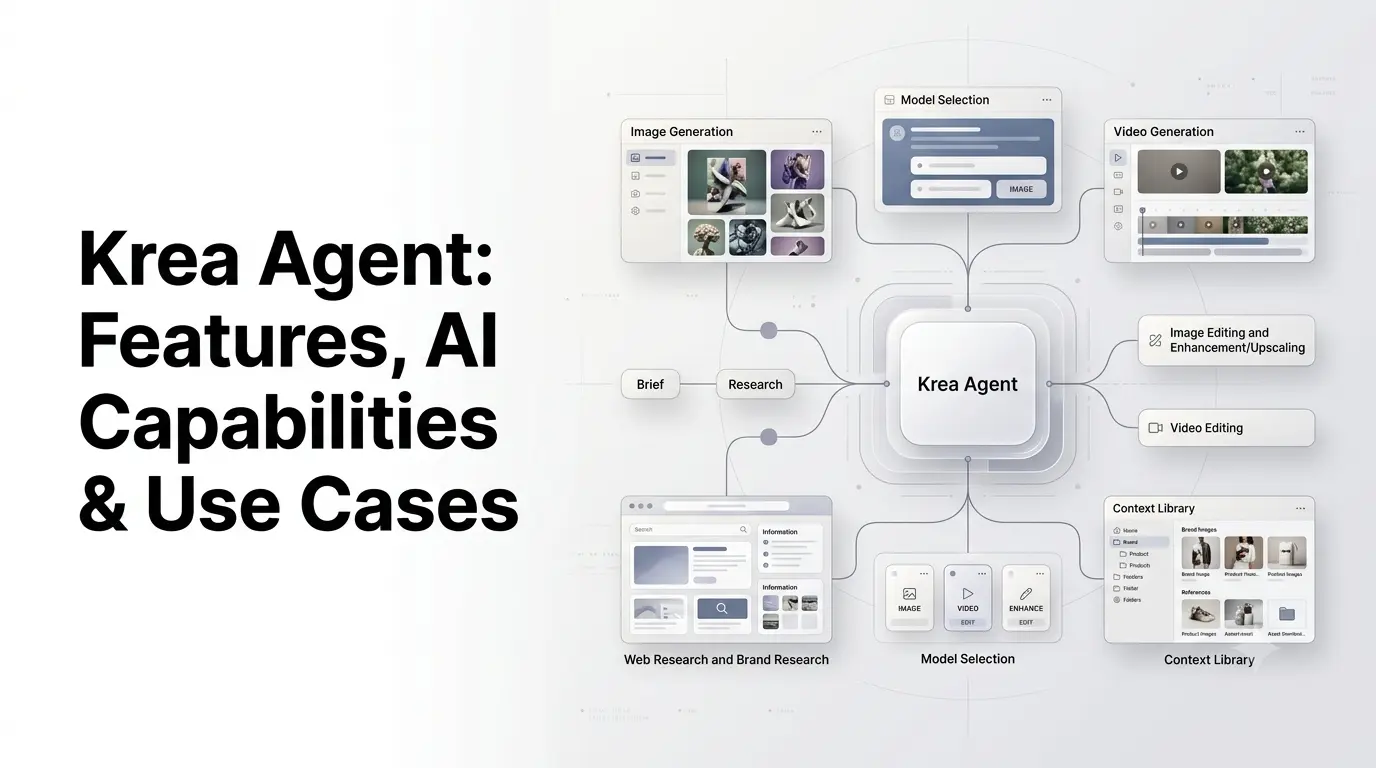
Krea Agent is an AI creative-production agent from Krea that can plan and execute multi-step visual workflows instead of simply generating a single image from a prompt. You describe the result you want in a chat, and the agent can research references, select appropriate image or video models, generate assets, review and edit them, organize files, and help turn a creative brief into production-ready output.
Krea introduced the Agent in September 2026, with the product positioned around autonomous creative production. Unlike a conventional image generator, it is designed to coordinate multiple tools and models within one workflow.
Quick Summary
- Krea Agent is an AI creative-production agent for managing multi-step visual workflows.
- It can handle image generation, video creation, editing, enhancement, research, and asset organization.
- Krea Agent can work with multiple AI models and select tools based on the task.
- Its context library helps maintain brand assets, references, and creative guidelines.
- Users can create reusable skills and routines for repeatable creative workflows.
- It supports use cases such as advertising, product photography, social media, branding, fashion, and video production.
- Krea Agent also includes a video editor for cutting, trimming, extending, and exporting clips.
- The article covers pricing, integrations, limitations, Krea Node Agent, and Krea Agent vs. traditional AI generators and ChatGPT.
What Is Krea Agent?
Krea Agent is an AI agent designed for creative production that turns a natural-language brief into a multi-step workflow involving research, image and video generation, editing, enhancement, organization, and export.
Instead of manually moving between Krea’s image generator, video tools, enhancement features, editing tools and asset library, users can describe the desired outcome and let the agent determine the steps required.
For example, a marketer could provide a product photo and website and ask Krea Agent to:
- Research the brand.
- Identify its visual style.
- Create several advertising concepts.
- Generate product images.
- Turn a selected image into a video.
- Adapt the campaign for different formats.
- Organize the resulting files.
The important distinction is that Krea Agent is not simply another AI image generator. It acts as an orchestration layer across Krea’s creative tools and models.
When Did Krea Agent Launch?
Krea’s official press information says Krea Agent launched on September 10, 2026, while Krea’s product documentation and launch material describe it as a beta product introduced around the same period.
Krea has continued adding capabilities after launch. For example, on September 17, 2026, Krea added a video editor inside Agent sessions, allowing users to place generated clips on a timeline, cut and trim them, extend clips with generative video, add audio and export an MP4.
This means Krea Agent should be viewed as an evolving product rather than a finished, static feature.
How Does Krea Agent Work?
Krea Agent combines an orchestrating AI model with a collection of specialized generation and editing models.
1. You provide a creative brief
The process starts with a natural-language instruction.
For example:
Create a product campaign for this speaker using a clean studio aesthetic. Make several image concepts and turn the strongest concept into a short vertical video.
The agent interprets the goal rather than requiring the user to manually select every tool.
2. The agent plans the workflow
Krea describes Agent as having an orchestration layer that reads the brief, plans actions, calls tools and reviews results.
Depending on the task, this can involve research, generation, editing, enhancement and file organization.
3. It chooses appropriate models
Krea Agent can work across Krea’s collection of image, video, audio and enhancement models.
Krea says its catalog contains more than 150 image, video, audio and enhancement models as of September 2026. The company gives examples including Krea 2, Nano Banana Pro, ChatGPT Image 2, Seedance 2.5 and Topaz.
The idea is that users don’t necessarily need to know which model is best for every stage of a project.
4. It reviews and iterates
The workflow can include reviewing generated results and requesting changes.
Users can also annotate generated images and ask for specific revisions within the Agent session.
5. It organizes the output
Generated and uploaded assets can be stored in Krea’s context library, where files can be organized into folders and reused in future work.
This is particularly relevant for teams that need consistent brand references across multiple campaigns.
What Can Krea Agent Do?
Krea Agent covers considerably more than basic text-to-image generation.
| Capability | What Krea Agent can do |
|---|---|
| Image generation | Generate individual images or batches |
| Video generation | Create videos from text or starting images |
| Audio | Generate speech and dialogue using supported tools |
| Image editing | Modify and revise existing visual assets |
| Enhancement | Upscale and improve images |
| Background removal | Remove backgrounds from images |
| Brand research | Read websites and research visual references |
| Web research | Search the web and image results |
| File organization | Store and organize project assets |
| Workflow automation | Save repeatable workflows as skills |
| Scheduling | Create recurring routines |
| Integrations | Connect supported external services |
| Video editing | Cut, trim, extend and export generated video |
The exact capabilities and model availability can change as Krea continues developing Agent.
Krea Agent’s Key Features
i) Multi-Step Creative Workflows
One of the defining features of Krea Agent is its ability to handle several stages of a creative project within one session.
A campaign might move from:
Brief → research → concept → image generation → review → editing → video → export
Rather than requiring the user to manually transfer files between different applications.
Krea says Agent can also run several creative directions in parallel, making it useful for exploration and iteration.
ii) Multi-Model AI Selection
Krea Agent can choose different models depending on the task.
For example, Krea’s September 2026 documentation describes defaults such as:
- Nano Banana Pro for edits and reference-following
- ChatGPT Image 2 for detailed and text-heavy layouts
- Krea 2 for fast exploration
- Seedance 2.5 for video
- Topaz for upscaling
These are examples of Krea’s current model-routing approach rather than a permanent list of models.
iii) Brand-Aware Creative Production
Krea Agent can research a company’s website and use brand information as part of a creative brief.
Its context library can also contain:
- Brand guidelines
- Product images
- Reference boards
- Approved creative
- Product information
- Previous outputs
This allows teams to establish a reusable source of context rather than starting every generation from scratch.
iv) Context Library
The context library is an important part of Krea Agent’s workflow.
Krea describes three levels of context:
- Session files — assets for the current task.
- My context — personal files and preferences.
- Workspace context — shared resources for a team.
The workspace layer can therefore act as a central repository for brand assets and references used by multiple team members.
v) Skills and Repeatable Workflows
Krea Agent can save workflows as skills.
For example, a creative team could establish a workflow for creating product ads and then reuse that process for future campaigns.
Krea also provides built-in skills covering areas such as product photography, poster design, fashion photography, static advertising, frontend design and marketing workflows.
vi) Routines
Agent can also create routines, which are recurring runs that start a new session according to a schedule.
This extends Krea Agent beyond one-off creative generation toward recurring production tasks.
External Integrations
Krea Agent supports connections to external services through integrations.
Krea’s September 2026 documentation lists services including:
- Slack
- Notion
- Linear
- Airtable
- Webflow
- Meta Ads
- Google Drive
- Google Docs
- Google Sheets
- Gmail
- Dropbox
- OneDrive
- GitHub
- WhatsApp Business
- YouTube
- Supabase
- TikTok Ads
- ManyChat
- Frame.io
- Figma
Availability and permissions can depend on the integration and workspace configuration.
Krea Agent Video Editing
Krea expanded Agent with an integrated video editor on September 17, 2026.
The editor provides a timeline where users can:
- Add video and audio tracks
- Cut clips
- Trim clips
- Move or delete clips
- Extend generated clips
- Add audio
- Export the finished project as an MP4
The generative extension feature can create additional footage after an existing clip. Krea currently supports extensions through selected video models, with the available models and technical limits subject to change.
There is an important distinction here: the Agent does not currently operate every timeline editing action automatically. Krea says users perform the timeline cuts, trims and extensions, while the agent can generate the underlying media and use tools such as FFmpeg for certain additional tasks.
Krea Agent Use Cases
1. AI Advertising
Krea Agent can turn product photos and brand information into advertising concepts.
A typical workflow could involve:
Product photo → brand research → creative concepts → ad variations → video adaptation → channel formats
Krea specifically positions Agent for campaign concepts, ad variants and UGC-style creative.
2. Product Photography
E-commerce teams can provide a product image and request different environments, compositions or campaign directions.
This can reduce the amount of manual work required to create multiple product-visual variations.
3. Social Media Content
Creators and marketing teams can use Agent to develop:
- Social images
- Short-form video
- Vertical content
- Promotional graphics
- Campaign variations
The same creative direction can then be adapted to different formats.
4. Branding
Krea Agent can work from brand references and guidelines stored in its context library.
This makes it useful for creating:
- Brand imagery
- Campaign concepts
- Packaging directions
- Visual references
- Promotional material
5. Architecture and Interior Design
Krea lists architecture and interior design among its Agent workflows.
Users can combine reference imagery with generated environments and visualization concepts to explore different design directions.
6. Fashion and Creative Campaigns
Fashion teams can use Agent to explore campaign concepts, photography directions, styling references and variations.
Krea’s broader platform is already positioned around creative workflows involving fashion, advertising and visual design.
7. Video Production
Instead of generating individual clips in isolation, creators can use Agent to plan multiple scenes and then work with those clips in Krea’s video editing environment.
This makes it possible to move closer to a complete short-form production workflow within one platform.
8. Creative Research
Agent can search the web and images and open URLs to extract information.
For example, a marketer could provide a company’s website and ask the agent to build a visual brand reference before generating campaign concepts.
Krea Agent vs a Traditional AI Image Generator
The main difference is workflow orchestration.
| Feature | Traditional AI Image Generator | Krea Agent |
|---|---|---|
| Text-to-image | Yes | Yes |
| Multi-step workflow | Limited | Yes |
| Model selection | Usually manual | Agent can select models |
| Brand research | Usually manual | Supported |
| Web research | Usually separate | Supported |
| Image editing | Varies | Supported |
| Video workflow | Often separate | Integrated into Agent workflow |
| Asset organization | Varies | Context library |
| Repeatable workflows | Limited | Skills |
| Scheduled workflows | Rare | Routines |
| External integrations | Varies | Supported integrations |
The distinction does not mean a conventional image generator is incapable of complex work. The difference is that Krea Agent is designed to coordinate multiple creative operations from a single instruction.
Krea Agent vs ChatGPT
Krea Agent and ChatGPT can both serve as conversational interfaces for creative work, but their roles differ.
Krea describes Agent as a production-focused system that can select from Krea’s image, video and other creative models, manage assets in its context library and execute multi-step visual workflows.
Krea also offers a separate Krea for ChatGPT integration, allowing Krea’s image and video capabilities and context library to be used from a ChatGPT conversation.
So these should not be treated as identical products:
- ChatGPT: general-purpose AI assistant.
- Krea Agent: creative-production agent built around Krea’s visual tools and model ecosystem.
- Krea for ChatGPT: an integration that brings Krea’s creative capabilities into ChatGPT.
Is Krea Agent Free?
Krea’s Agent access and pricing have been changing during its beta period, so users should check the current Krea account and pricing pages before subscribing.
Krea’s September 2026 Agent guide states that Agent is included with Max, Business, Creator Max and Enterprise plans, while users on other plans may be able to unlock access with an access code. Krea also says Agent generations use the user’s normal Krea compute credits rather than creating a separate Agent bill.
Krea’s broader pricing structure uses compute units for generation and varies by subscription. Because plan entitlements can change, the current account page is the appropriate source for a purchase decision.
What Are the Limitations of Krea Agent?
Krea Agent is still in beta, and several limitations are explicitly documented by Krea.
a) 3D Workflows Are Not Fully Inside the Web Agent
Krea says 3D generation is not currently part of the web Agent experience, although it can be accessed through other Krea agent interfaces such as MCP and Slack.
b) Krea Nodes Are Separate
Krea Agent does not currently run Krea Nodes graphs. Krea Nodes has its own prompt-to-workflow agent.
This distinction matters because Krea Agent and Krea Node Agent are different products.
c) Video Timeline Editing Still Requires User Interaction
The video editor can generate and extend media, but Krea says the Agent does not currently operate every timeline action automatically. Users still handle operations such as cutting and trimming directly on the timeline.
d) Beta Reliability
Krea notes that some jobs can fail and require a retry. The Agent can automatically retry many generation failures, but it should not be treated as a completely autonomous production system.
Krea Agent vs Krea Node Agent
This is an important distinction for anyone researching Krea’s agent products.
Krea Agent is the broader conversational creative-production agent. It can research, generate, edit, organize and coordinate creative tasks.
Krea Node Agent is designed specifically around Krea Nodes. It turns a natural-language description into a runnable node-based workflow. Krea explicitly says the two products are different.
In simple terms:
| Product | Primary purpose |
|---|---|
| Krea Agent | Creative production across Krea’s tools |
| Krea Node Agent | Building workflows inside Krea Nodes |
Who Should Use Krea Agent?
Krea Agent is particularly relevant for people who regularly create visual assets rather than generating an occasional image.
Potential users include:
- Marketing teams creating campaign assets
- Content creators producing images and short videos
- Designers exploring multiple visual directions
- E-commerce teams creating product imagery
- Creative agencies managing multiple campaigns
- Brand teams maintaining visual consistency
- Architects and designers exploring visual concepts
- Video creators combining generated clips into short productions
Its biggest value is likely to come from workflows where several creative steps have to be repeated.
How to Get Better Results From Krea Agent?
A useful Agent brief should describe the outcome, not just the individual generation.
Instead of:
Make an image of a running shoe.
Try:
Create a product campaign for this running shoe. Use the attached product image as the reference, maintain the exact product design, explore three outdoor concepts, choose the strongest direction, create a 4:5 social ad and then make a short vertical video variation.
The second brief gives the Agent more information about:
- The objective
- The reference
- The creative direction
- The number of variations
- The final formats
- The workflow
For repeat campaigns, storing brand guidelines, approved references and previous work in the context library can also give the Agent more consistent information to work from.
Conclusion
Krea Agent represents Krea’s move from individual AI generation tools toward an agentic creative-production workflow. Instead of asking users to select a model, generate an asset, edit it, organize the output and repeat the process manually, Agent can coordinate many of those steps from a single creative brief.
Its most significant capabilities include multi-step workflows, model selection, brand research, context management, image and video generation, editing, integrations, reusable skills and recurring routines. Krea AI has also expanded Agent with a video editor, making the platform more useful for complete creative-production workflows.
The main caveat is that Krea Agent remains a beta product, and some workflows still require human review or manual interaction. For creative teams, however, its approach is notable because it treats AI generation as part of a broader production pipeline rather than as a standalone prompt-to-image tool.
Frequently Asked Questions
1. What is Krea Agent?
Krea Agent is an AI creative-production agent that can plan and execute multi-step workflows involving image generation, video, editing, research, enhancement and asset organization.
2. Is Krea Agent the same as Krea AI?
No. Krea is the broader AI creative platform, while Krea Agent is an agentic interface that coordinates Krea’s creative tools and models.
3. What models does Krea Agent use?
Krea Agent can select from Krea’s available image, video, audio and enhancement models. Krea’s September 2026 documentation lists models including Krea 2, Nano Banana Pro, ChatGPT Image 2, Seedance 2.5 and Topaz among its examples. The available model catalog can change over time.
4. Can Krea Agent create videos?
Yes. Krea Agent can generate video and, since September 17, 2026, includes a timeline-based video editor for cutting, trimming, extending and exporting generated clips.
5. Can Krea Agent research a website?
Yes. Krea says Agent can open URLs, read webpage content and use web and image search as part of a creative workflow. This can help it build brand context before generating visual assets.
6. Does Krea Agent use separate credits?
Krea says Agent generations use the user’s normal Krea compute credits rather than requiring a separate Agent billing system. Access to Agent itself depends on the applicable plan or account access.
Also Read –
Krea Agent Custom Apps for Creative Workflows
Krea AI: What Is It? Features, AI Tools, Models & Use Cases