

As 2025 draws to a close, Microsoft’s AI assistant system continues to grow at the speed of light, with notable advancements across its Copilot product line. The year 2025 has witnessed expanded models, more robust enterprise integrations, and improvements to the customer experience across Microsoft 365 apps. Two noteworthy developments, the introduction of OpenAI’s GPT-5.2 within Copilot and the targeted improvement of Copilot’s interaction options and user interfaces, are influencing how companies and users use AI. While some new technologies and projects are still under development, the overall trend points to a more context-aware, personal, and efficient AI assistant. This article summarizes Microsoft Copilot and the most recent confirmed developments as of December 2025.
What Is Microsoft Copilot Today?
Microsoft Copilot is a generative AI assistant integrated across Microsoft software and other services. It is specifically designed to assist users with tasks using natural language prompts. The initial launch was a development of Microsoft’s previous AI experience. Copilot currently spans Microsoft 365 applications (Word, Excel, Outlook, Teams), the Copilot mobile app, and its Windows 11 taskbar, delivering efficiency and creative support across different platforms. Copilot integrates large language models, such as OpenAI’s GPT series, to create text plans, create tasks, analyse data, and then present content in context.
Copilot’s integration is more than just chat. It uses Microsoft Graph to understand user workflows, meetings, files, and communications, enabling more tailored, context-aware assistance in both personal and business environments.
GPT-5.2 Integration: What It Means for Copilot Users?
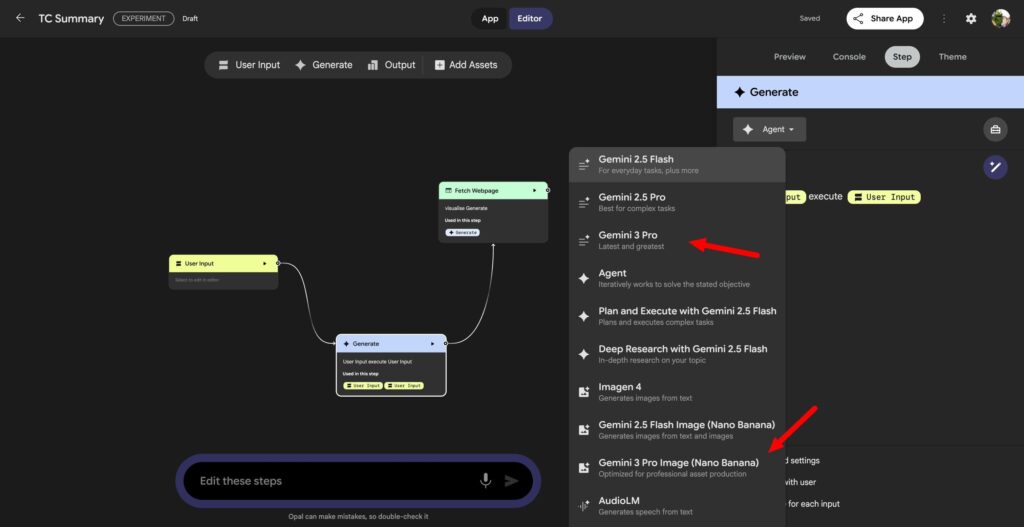
One of the most significant AI milestones of the year 2025 was the integration of the OpenAI GPT-5.2 model into Microsoft Copilot. Microsoft has announced that GPT-5.2 is now accessible within Microsoft 365 Copilot, along with Copilot Studio, which makes it available through the model menu in Copilot Chat and other Copilot user interfaces. Users from both the business and personal sides can select GPT-5.2 for the latest capabilities to tackle complex problems or produce high-quality content.
GPT-5.2 provides significant enhancements in performance and capabilities over the previous versions, and includes enhanced reasoning, the ability to code, handle context, and multi-step task efficiency. The variants, typically referred to as “Instant” for efficient everyday inquiries and “Thinking” for deeper strategic understanding, are crafted to match users’ needs and workflows better.
For users in the business sector, GPT-5.2’s integration ties into Microsoft’s Work IQ, a contextual intelligence layer that links Copilot to your organization’s data and patterns, helping uncover new insights and offer suggestions in emails, meetings, and documents.
Why GPT-5.2 Matters?
- Strategic analytics and deeper reasoning: Strategic analytics and deeper reasoning: Strategic analytics and deep reasoning. “Thinking” variant of GPT-5.2 can handle complex tasks such as trend analysis and multi-stage workflows.
- Effectiveness for daily routine tasks: “Instant” mode provides quick responses to writing assignments and translation, as well as for fast inquiries.
- Enterprise-ready performance: Increased capabilities for programming, spreadsheet work, and presentation generation. Research workflows to ensure Copilot aligns with business-specific use cases.
Across Microsoft’s network, GPT-5.2 is being rolled out slowly, with specific user segments getting first access, and availability to all users expected to increase within the next few weeks.
Microsoft Copilot: Intelligent Mode Becomes Smart Plus
In the year 2025, Microsoft announced “Smart Mode” in Copilot, a feature that automatically routes requests to the most competent model that can be used for the task at hand, which will eliminate the need for users to select manually or determine which model will work best.
In light of recent industry developments, this experience is evolving toward a new naming convention: Smart Plus. While Microsoft hasn’t released official documents under this name until now, this change aligns with the product’s overall refinement and signals a shift towards a more streamlined interface. Smart Plus aims to simplify model selection by providing intelligent settings and ad hoc responses that align with intent, without manual configuration.
In Smart Plus, users can anticipate AI responses that dynamically balance speed and depth depending on the nature of the task, such as summarizing a meeting transcript, creating business proposals, or analyzing a database.
Microsoft Copilot: merging “Flight Log” Insights
As Copilot evolves, the tech world is discussing features that let users visualize and revisit AI actions over time. Some sources outline an initiative that is commonly known as”An AI interaction log. It is also known as “Flight Log,” a structured account of AI interactions that can help users track information, review previous interactions, and analyze how Copilot has helped them over time.
While Microsoft hasn’t released an official feature named Copilot Flight Log as of the end of 2025, the concept aligns with broader AI usability trends by providing audit trails, interaction summaries, and context-specific follow-ups that help users create seamless AI workflows. It is important to note that enterprises already have Copilot audit logs in place to ensure compliance and oversight, and to record the resources utilized as a result of AI commands.
An AI interactive history option may expand this functionality by providing users with an overview of the most important actions, prompts, and responses and outputs, even though the actual public documentation is in the works.
Broader Copilot Enhancements in 2025
Microsoft’s 2025 updates illustrate an overall push towards AI that seamlessly integrates work and everyday life:
- Agent Support Expanded: At Microsoft Ignite 2025, the company demonstrated its growing AI agent capabilities in Copilot, enabling targeted task automation and improved teamwork.
- Copilot is Available in Windows and Edge: A deep integration between Windows 11 and Edge helps the assistant stay aware of its surroundings and be more accessible.
- Voice and Mobile Interactions: Copilot’s reach continues to extend to mobile applications and voice-driven commands, blurring the lines between traditional productivity tools and intuitive AI-powered partners.
Final Thoughts
As Microsoft Copilot matures, the direction is clear: more intelligence, less friction, and greater integration across personal and work computing environments. GPT-5.2 improves Copilot’s capability to analyse, reason, and perform complex tasks. Smart Plus aims to deliver these advantages with minimal user involvement. Though concepts like the Copilot “Flight Log” are just beginning to emerge, they represent an overall trend in the industry towards transparency, consistency, and long-term value of AI interactions. As we move into 2025, Microsoft’s strategy positions Copilot not only as an aid to productivity but also as an ongoing AI assistant that can adapt to users’ needs, contexts, and goals over time.
Frequently Asked Questions
1. What is GPT-5.2 in Microsoft Copilot?
GPT-5.2 is the most recent version of OpenAI’s fundamental AI model that is now accessible within Microsoft Copilot, offering improved reasoning efficiency, as well as tasks that perform better in everyday and more complex workflows.
2. What does Smart Plus improve in the Copilot user experience?
Smart Plus builds on older AI routing features to automatically choose the most suitable AI system for your needs, eliminating the need for manual adjustments and simplifying interactions.
3. Do you have a “Flight Log” feature in Copilot?
Although Microsoft hasn’t officially announced the feature under this name, ongoing discussions suggest the possibility of enhancements to provide a summary and track AI interaction history to help users. The formal documentation is not yet available.
4. Do I have to select GPT-5.2 to perform specific jobs within Copilot?
Absolutely, GPT-5.2 can be accessed via model selection in Copilot Chat and Copilot Studio, and you can select it when you need the most recent capabilities.
5. Does Copilot keep my data private?
Microsoft Copilot utilizes enterprise-grade security and privacy standards in conjunction with Microsoft 365, including security for handling interactions and information storage.
6. Is Copilot accessible?
Copilot integrates with Microsoft 365 apps, Windows 11 Copilot, the Copilot mobile application, and web browsers such as Edge, making it accessible across all devices and settings.

