Over the years, many power users have complained about the iOS keyboard experience, particularly in comparison to the freedom and customisation offered by Android. While the Apple keyboard is secure and stable, it is not always up to par for those who depend heavily on speed, automated or other input methods.
This chasm became more apparent as AI-powered voice dictation grew. On desktops, dictation quickly became the primary input method for writers, developers, and professionals in the field of knowledge. On mobile devices, however, voice input was sporadic, limited to specific applications, of inconsistent quality, or completely absent in the workflows that matter.
The landscape is evolving with the Typeless keyboard for iOS, specially designed for users who require dictation-first workflows that do not compromise control, consistency or efficiency.
What is Typeless Keyboard for iOS?
Typless Keyboard on iOS features an AI-powered keypad that combines traditional typing with advanced voice dictation in a single seamless interface. Unlike standard mobile keyboards or built-in dictation tools, Typeless focuses on cross-device compatibility, configurability, and productivity improvements.
In essence, Typeless treats voice dictation as a first-class input method instead of a second-rate feature. The keyboard lets users seamlessly switch between dictation and typing without losing formatting, context, or personal preferences.
Developed in collaboration with Typless and Typeless, the keyboard is designed for professionals who depend on AI tools and desire the same level of efficiency on mobile as on their desktop.
Seamless Switching Between Typing and Dictation
One of the best aspects of Typeless is the way it lets users switch between speaking and typing. There’s no friction, no hidden modes in menus, and no interruptions to the writing flow.
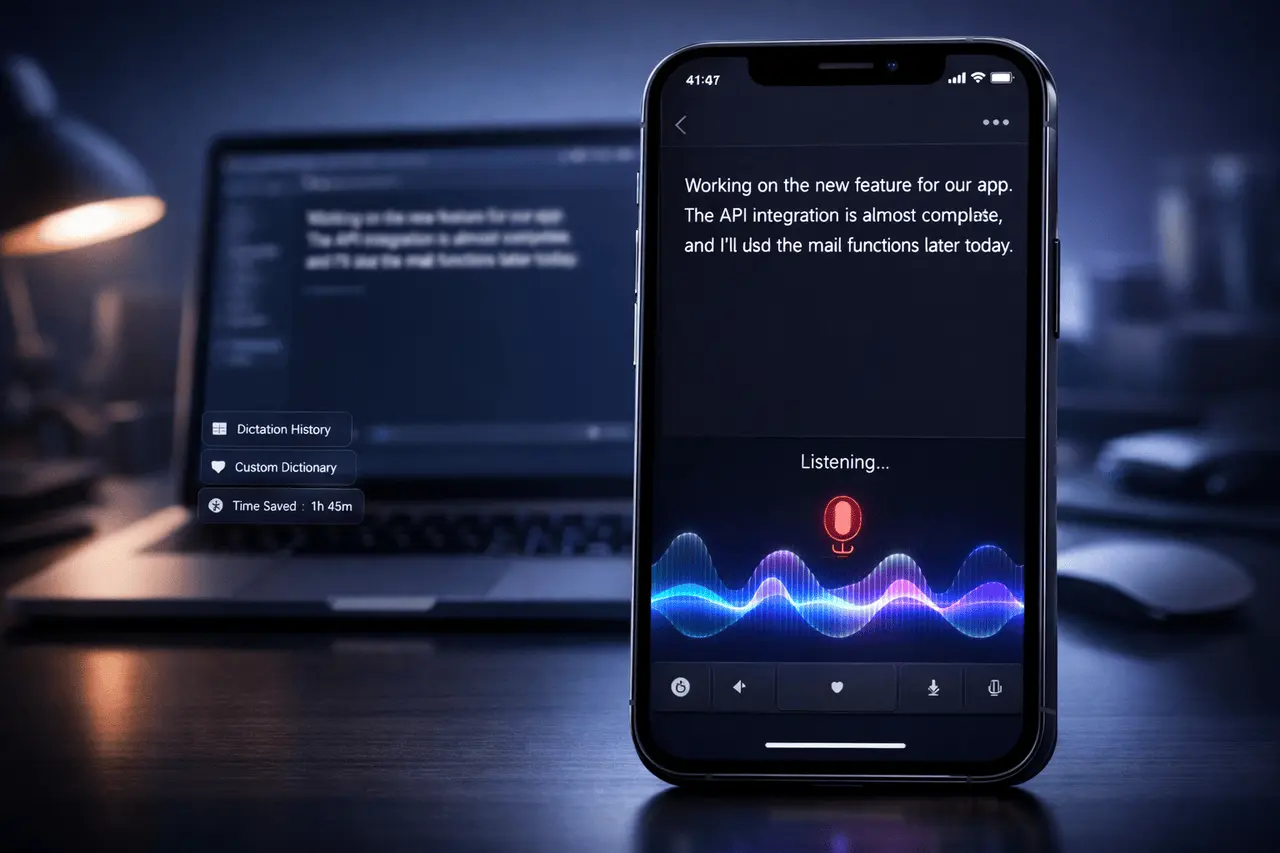
A subtle yet vital visual cue, such as a wave animation, indicates whether the keyboard is recording. This feature alleviates one of the most significant issues with mobile dictation: not knowing whether the microphone is listening. By instantly making recording status visible, Typeless reduces errors, missing inputs, and the need to recheck the input constantly.
Cross-Device Sync: Mobile and Desktop in One Workflow
The biggest drawback of mobile dictation applications is their isolation. The dictated text is often stored in a single app or completely erased in the event of a problem.
Typeless can address this issue with complete sync between desktop and mobile applications. Users can use:
- All keyboard configurations across devices
- History of dictation: Searchable and reusable
- Text previously dictated from any connected device
This technique assures that mobile dictation is not a dead end. Ideas dictated on a smartphone can be analysed, edited, and later reused on a desktop without manually copying notes from third-party sources.
Dictation History That Prevents Data Loss
The loss of text during dictation is a common problem with standard voice input functions. App crashes, navigation issues or accidental taps could cause the loss of minutes of recorded content.
Typeless automatically saves the dictated text, creating a reliable archive that users can revisit anytime. Voice input is more secure for long-form writing, code notes, explanations of technical aspects or brainstorming sessions, where losing information could be costly.
Custom Dictionary for Faster, Smarter Dictation
Generic dictation systems typically struggle with abbreviations, technical terms, variable names, and personal shorthand. Repeatedly rewriting the exact words can degrade any gains in productivity.
Typeless comes with a customised dictionary feature that teaches and maintains the users’ own vocabulary. Once it is set up, abbreviations and special terms are properly recognised each time, drastically reducing post-dictation edits.
For analysts, developers, and technical writers, this one feature could help you save time in just one month.
Typeless Keyboard for iOS: Enabling “Vibe Coding” From Mobile
Typeless is noticeable for its ability to integrate into modern AI-driven workflows. Users can directly dictate into applications such as Claude Code or AI Studio via mobile devices, which allows what is described by many as “vibe code, rapid, and conversational interaction with AI programming environments.
This feature eliminates a long-standing obstacle that has prevented meaningful AI-aided development on the phone. When it comes to refining prompts, drawing logic, or creating code concepts, Typeless makes mobile input feasible for serious technical work.
Measuring Productivity With Built-In ROI Tracking
Many keyboards claim to boost productivity, but they do not provide a way to quantify the results. Typeless differs in that it measures the time users can save through dictation and automation.
This is the main page that shows the amount of time saved, which allows users to calculate the return on investment by using an easy formula:
The time saved per hour = Return on Investment
for freelancers, consultants and professionals who bill by hour. It transforms productivity improvements into tangible value, rather than abstract advantages.
Why Typeless Stands Out Among iOS Keyboard Alternatives?
When compared to traditional iOS keyboards as well as basic tools for dictation, Typeless offers several clear advantages:
- Dictation-first design instead of add-on voice input
- Reliable visual recording feedback
- History and cross-device syncing access
- Custom vocabulary support
- Compatible with AI Development tools
- Metrics of productivity that can be quantifiable
Instead of competing with aesthetics or innovation, Typeless focuses on solving the real workflow issues encountered by advanced users.
Who should use Typeless Keyboards for iOS?
Typeless is specifically suited to:
- Engineers and developers working with AI tools
- Content creators and writers who write frequently
- Professionals and consultants track the time they bill.
- Power users who are fed up with traditional iOS keyboards
- Anyone who is looking for a unified mobile-desktop workflow for dictation
While non-professional users could benefit, Typeless clearly targets those looking for speed as well as accuracy and effectiveness.
Final Thoughts
The development of AI voice dictation has been faster than that of mobile keyboards to date. The Typeless Keyboard app for iOS can close that gap by providing a dictation-first experience that is designed to be compatible with modern, AI-driven workflows.
Through smooth cross-device sync of custom dictionaries and ROI tracking, Typeless converts mobile dictation from a convenience feature into an essential productivity tool. For users who depend on AI methods of input elsewhere, this now provides the same level of control and effectiveness on iOS.
Frequently Asked Questions (FAQs)
1. Is the Typeless Keyboard for iOS an alternative to the standard iOS keyboard?
Yes. Typeless is a complete keyboard replacement that also provides advanced dictation capabilities and productivity features beyond Apple’s standard keyboard.
2. Does Typeless work with several devices?
Yes. Typeless can sync configurations, dictation history, and saved text between desktop and mobile applications, enabling consistent workflows.
3. Does Typeless recognise technical abbreviations and terms?
Yes. The customised dictionary lets users create and maintain specific vocabulary, reducing the need for repeated corrections.
4. Are the documents you dictate stored securely?
Typeless stores typing automatically, helping prevent the data loss common when using standard dictation tools.
5. Is Typeless used in conjunction with AI Coding tools?
Yes. Typeless enables voice-driven interaction with tools such as Claude Code or AI Studio directly on mobile devices.
6. What is the best way to evaluate productivity?
The keyboard monitors the time saved by dictation and displays it in the UI, allowing people to estimate ROI based on their hourly rates.
Also Read –